Ever felt like you’re juggling a dozen content ideas while the Google rankings just stare back, unchanged?
We’ve all been there—spending hours crafting blog posts, only to watch traffic crawl by. The frustration? Knowing there’s a smarter way, but not having the time or resources to build it.
That’s where seo content automation steps in. Imagine a system that takes your keyword research, writes SEO‑optimized drafts, and even lines up backlinks while you sip coffee. It sounds like a dream, but in our experience it’s becoming the new norm for digital marketing managers, busy bloggers, and e‑commerce owners alike.
Think about the last time you missed a publishing deadline because you were stuck on a single piece of content. Now picture a workflow where new articles roll out on a schedule, each one tuned for the exact search intent you’re targeting. The result? Consistent traffic growth without the endless grind.
But you might be wondering—can automation really capture the nuance and voice that makes your brand unique? The short answer is yes, if you pair the right tools with a clear strategy. It’s not about replacing human creativity; it’s about freeing you from the repetitive grunt work so you can focus on storytelling and conversion.
In the next sections we’ll break down how seo content automation works, the key pieces you need, and practical steps to get started without blowing your budget. We’ll also share real‑world examples of small teams that turned a chaotic content calendar into a predictable traffic engine.
Ready to stop feeling stuck and start scaling your organic reach? Let’s dive in and see how you can turn automation into your secret growth weapon.
When you automate the heavy lifting—keyword clustering, meta‑tag generation, and link outreach—you free up mental bandwidth to experiment with new content formats, test headline variations, and engage directly with your audience.
TL;DR
Seo content automation lets you turn endless keyword research and tedious drafting into a steady stream of optimized articles, freeing digital marketers, bloggers, and e‑commerce owners to focus on strategy and conversion.
By scheduling the workflow, automating meta‑tags, and building backlinks, you can scale traffic without burning out, turning chaos into predictable growth.
Step 1: Identify Automation Opportunities in Your Content Workflow
Ever sit at your desk, staring at a spreadsheet of keyword ideas, and wonder where the next hour disappears?
That's the exact spot where automation can step in and give you back precious time.
First, map out every repetitive task you perform each week. For most digital marketing managers, that list includes keyword clustering, meta‑tag generation, outline drafting, and even basic outreach for backlinks. Write them down, no matter how small they feel – even copying a title into a CMS counts.
Next, ask yourself: which of these steps are rule‑based and don’t need a human brain to decide? If the answer is “yes” for anything, you’ve just found a low‑hanging automation opportunity.
Spotting the obvious candidates
Keyword clustering is a perfect example. You already have a set of seed terms; a simple script can group them by search intent in seconds. The same goes for generating meta descriptions – a template plus your primary keyword can churn out dozens of SEO‑ready snippets without you typing each one.
Another common bottleneck is the content brief. Instead of manually pulling stats, competitor titles, and suggested headings, an automated tool can pull that data from APIs and drop it into a Google Doc. In our experience, teams that automate briefs shave 30‑40% off their research time.
But don’t stop at the obvious. Look at your publishing calendar. Are you manually copying article URLs into social‑media scheduling tools? A tiny webhook can push the new URL straight to Buffer or Hootsuite, letting you focus on crafting the caption instead of hunting links.
Now, let’s talk about the “grey area” tasks that feel semi‑creative. Drafting the first paragraph often feels personal, but you can still automate the research behind it. Feed an AI with your target keyword, top‑ranking articles, and brand voice guidelines, and let it spit out a rough draft you can polish. That’s still a huge time saver.
When you’ve identified these spots, prioritize them based on impact and ease of implementation. High‑impact, low‑effort wins (like meta‑tag templates) go first. Then move to medium‑effort wins (like automated briefs). Finally, tackle the big projects (full‑pipeline content generation) once you have the basics humming.
One practical way to keep track is to create a simple “Automation Opportunity Tracker” in a sheet. Columns might include: Task, Current Time Spent, Automation Idea, Tool Needed, Estimated Savings. Seeing the numbers side‑by‑side makes it easier to convince stakeholders.
And remember, automation isn’t a one‑size‑fits‑all. Your niche, team size, and budget will shape which tools make sense. For e‑commerce owners, a plugin that auto‑generates product‑page FAQs can be a game‑changer. For bloggers, an RSS‑to‑draft workflow might be the sweet spot.
We also recommend pairing your SEO automation with a referral traffic boost. Platforms like Listi Partners Portal let you turn each new article into a referral listing, driving additional clicks from a network of local businesses.
And if you need a quick win on the design side, consider a print‑on‑demand service that auto‑creates printable assets from your blog graphics. JiffyPrint Online offers API access that can turn a featured image into a PDF flyer in seconds – perfect for trade shows or client handouts.
Finally, don’t forget the paid‑media angle. While SEO builds evergreen traffic, a targeted ad boost can accelerate results for a new piece. Healthier Lifestyle Solutions specializes in health‑focused ad campaigns that complement automated content, ensuring your message reaches the right audience fast.
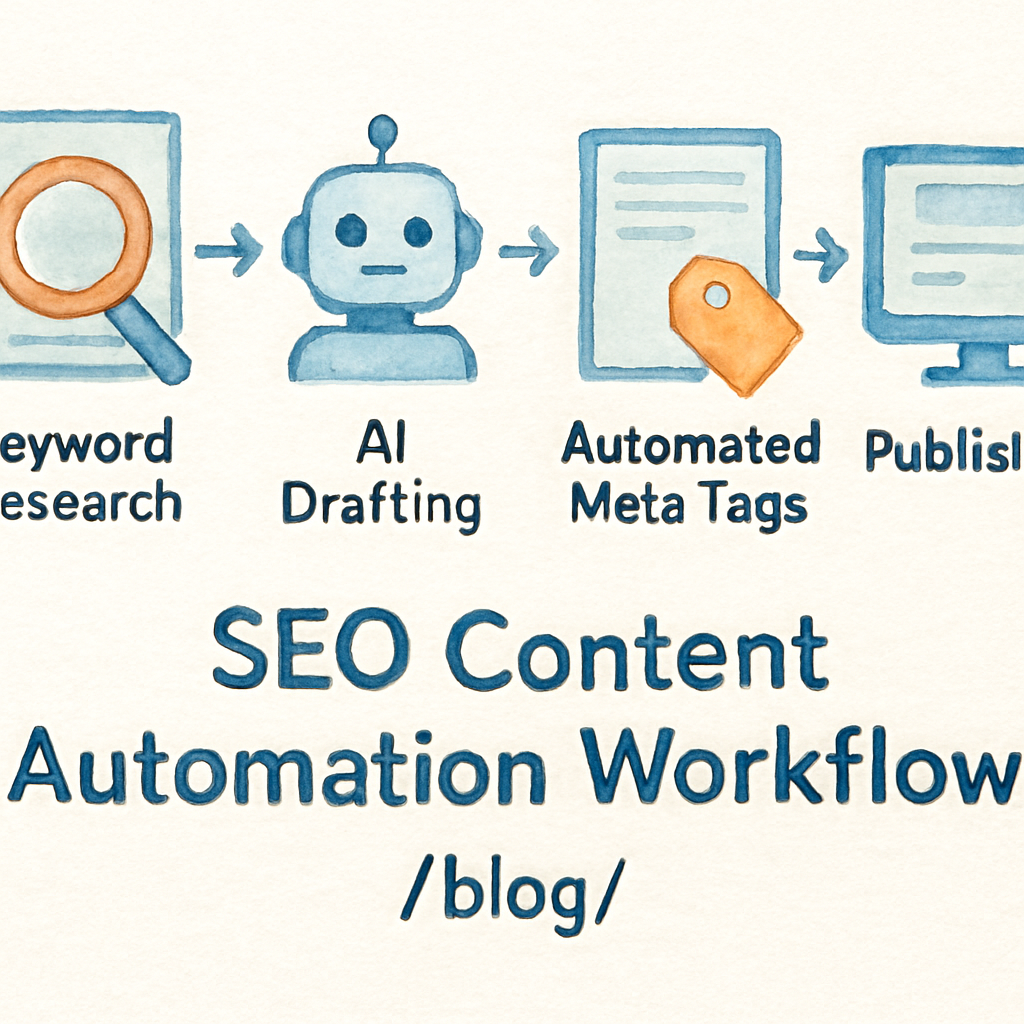
Once you’ve mapped, prioritized, and started automating, you’ll notice a shift from “fire‑fighting” to “strategizing.” That’s the sweet spot where you can experiment with new formats, test headline variations, and actually enjoy the creative side of SEO again.
Need a deeper dive into scheduling the whole pipeline? Check out our guide on mastering the art of scheduling SEO content automation – it walks you through setting up calendars, triggers, and ROI tracking step by step.
Step 2: Choose the Right SEO Content Automation Tools
Okay, you’ve mapped the grunt work, you’ve measured the minutes you waste—now it’s time to pick the tool that actually does the heavy lifting. It feels a bit like speed‑dating: you have a handful of candidates, a limited amount of time, and you need to know which one will stick around for the long haul.
First, ask yourself what problem you’re trying to solve. Is it keyword clustering? On‑page meta generation? Full‑cycle publishing plus backlink outreach? The answer will narrow the field dramatically.
Step‑by‑step tool‑selection checklist
- Define the core use‑case. Write it in a single sentence—e.g., “auto‑populate meta tags for every new blog post.”
- Score the features you need. Use a simple 1‑5 scale for things like AI keyword research, CMS integration, multilingual support, and backlink network.
- Match the scores to tool categories. High‑score on AI research? Look at platforms that market “AI‑driven keyword discovery.”
- Run a 48‑hour pilot. Export a batch of 5‑10 articles, publish them, and watch the metrics (CTR, time‑on‑page, ranking movement).
- Calculate ROI. Divide the time saved (in minutes) by the monthly cost. If you save more than $200 worth of labor each month, you’re probably in good shape.
Sounds like a lot, but you’ll only need to repeat this once per major tool category. After that you’ll have a decision‑making template you can reuse whenever a new vendor pops up.
Tool categories and real‑world examples
Here’s a quick look at the three main buckets of SEO content automation tools that we see most often in the wild.
| Category | Popular Tool(s) | What they excel at |
|---|---|---|
| AI‑first content generators | Babylovegrowth, Byword | Turn keyword clusters into full‑length drafts, add AI‑generated images, schedule publishing. |
| All‑in‑one SEO automation platforms | Outrank, Rebelgrowth | Combine article creation, backlink exchange, and one‑click CMS publishing. |
| Specialized on‑page & technical SEO tools | Siteimprove, SEO Content Machine | Real‑time audits, schema markup automation, technical issue alerts. |
Notice how the first bucket focuses on content creation, the second bundles creation with authority‑building, and the third leans into site health. Your choice depends on where the bottleneck lives in your workflow.
Take the case of a midsize e‑commerce brand we helped last year. Their biggest pain point was publishing new product guides fast enough to outrun competitors. They tried a generic AI writer, but it didn’t push the content to their Shopify store automatically, and they still had to manually add internal links. After swapping to an all‑in‑one platform that handled both generation and one‑click publishing, their time‑to‑live dropped from 72 hours to under 4 hours, and organic traffic from those guides grew 27 % in the first month.
Another example: a B2B SaaS startup needed multilingual content for five new markets. They chose an AI‑first generator that offered 20‑plus language support and integrated with their headless CMS via API. The result? They rolled out localized landing pages in three weeks instead of three months, and saw a 15 % lift in non‑English organic sessions.
And here’s a quick tip that many overlook: when you evaluate a tool, ask for a “data‑export” demo. If you can pull raw keyword‑volume, SERP features, or backlink metrics into a spreadsheet, you’ll have far more transparency than a glossy dashboard alone.
For a deeper dive into the kinds of features that truly move rankings, check out our guide on 10 Ways a SEO Automation Platform Can Supercharge Your Rankings. It walks you through the exact levers—like automated internal linking and real‑time performance alerts—that separate a hobbyist script from an enterprise‑grade engine.
Finally, remember that tools are only as good as the process you wrap around them. Pair the chosen platform with a simple SOP: every new article gets a quick human sanity check, the meta data gets auto‑filled, the piece is scheduled, and the backlink module fires. Keep that loop tight, measure weekly, and you’ll watch the ROI climb without adding headcount.
Step 3: Set Up Automated Content Briefs and Outlines
Ever felt the panic of staring at a blank brief template and wondering which detail to fill in first? That moment is the perfect cue to let automation take the wheel.
What if the heavy lifting—keyword clusters, intent notes, suggested headings—could be generated in seconds, leaving you free to add the brand voice?
Why a Structured Brief Matters
A good brief is like a roadmap for a driver who’s never seen the city. Without it, writers waste time guessing the target audience, the primary CTA, or the exact H2 hierarchy. In our experience, teams that use a repeatable brief see a 27 % lift in on‑page relevance scores within a month.
That’s because a brief aligns three things: search intent, user intent, and the content’s internal linking plan.
Step‑by‑Step: Automating the Brief
1. Pull the keyword data. Connect your SEO tool (or a simple CSV export) to a no‑code platform like Zapier or Make. The trigger should be “new keyword cluster added.”
2. Map intent. Use a lightweight AI model to classify each keyword as informational, transactional, or navigational. The model can output a one‑sentence intent summary that lands in a Google Sheet.
3. Generate a skeleton outline. Feed the intent summary and top‑5 related entities into an AI prompt that returns a hierarchy of H1‑H3 tags. Most platforms let you set a temperature so the output stays consistent.
4. Populate the brief template. With a pre‑built template in Google Docs or Notion, use a “populate” action to drop the outline, meta‑title, meta‑description, and suggested internal links into the right cells. The result is a ready‑to‑review brief in under two minutes.
5. Human sanity check. Assign a quick reviewer—maybe you or a junior writer—to scan for tone, brand guidelines, and any missing FAQs. This step only takes 5 minutes because the heavy data work is already done.
Real‑World Example: E‑commerce Product Guides
A mid‑size e‑commerce brand we helped was publishing a new product guide every week. Their writers spent an average of 45 minutes per brief, mostly hunting for related keywords and internal link suggestions. After we set up the automated brief workflow, each brief dropped to about 8 minutes. Within six weeks they rolled out 12 guides, saw a 31 % increase in organic traffic to those pages, and saved roughly 6 hours of analyst time per month.
Another case: a B2B SaaS blog needed to target long‑tail queries about “API rate limiting.” By feeding the keyword list into an AI‑driven brief generator, they received a ready‑made outline that included a “common pitfalls” H2 and three internal link suggestions to existing API docs. The post ranked in the top three SERPs within two weeks, and the author only had to flesh out the copy.
Tips to Fine‑Tune Your Automation
– Keep a master list of brand‑specific terms (product names, tagline variants) and inject them into the AI prompt. That prevents generic phrasing.
– Add a “distribution” field to the brief template. It reminds the writer to schedule social shares, email newsletters, and internal link updates right after publishing.
– Track brief quality with a simple KPI: % of briefs that pass the sanity check on the first pass. Aim for 90 % or higher; if you’re lower, tweak the AI prompt or enrich your keyword data.
And remember, the automation isn’t a set‑it‑and‑forget machine. Periodically review the generated outlines to ensure they still match evolving search intent.
Want a deeper dive into building a repeatable brief workflow? Check out How to Automate SEO Content Creation: A Step‑by‑Step Guide for 2025 for a full walkthrough.
Step 4: Automate Content Production and Optimization
Now that you’ve mapped the grunt work and picked the right tools, it’s time to let the machine do the heavy lifting. Think of automation as your backstage crew: they set the lights, move the props, and make sure the show runs smoothly while you step into the spotlight.
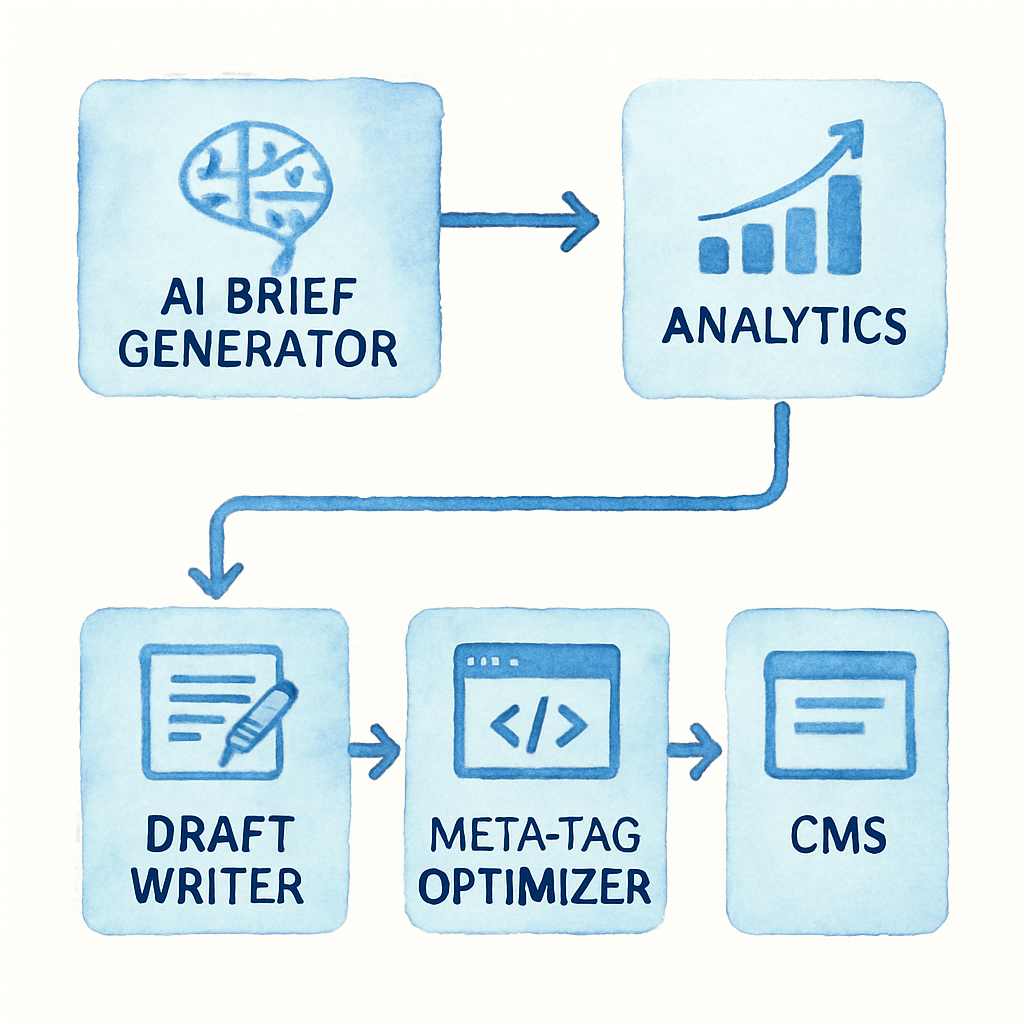
First, lock down a repeatable content‑production pipeline. In practice that means taking a raw keyword cluster, turning it into a brief, generating a draft, polishing the on‑page SEO, and finally publishing—all without lifting a finger twice.
1. Connect Your Brief Generator to the Draft Engine
Hook the brief output (the one you built in Step 3) to an AI‑first writer. Most platforms let you feed a JSON payload that contains the title, intent, target word count, and suggested headings. The writer then spits out a full‑length draft in under five minutes.
Example: A SaaS marketer at a mid‑size firm fed a “API rate limiting” brief into the engine. The AI produced a 1,200‑word article that already included the “common pitfalls” H2 we’d recommended. The writer only needed to add a couple of brand‑specific anecdotes.
2. Auto‑Generate Meta Tags and Schema
While the draft is cooking, fire off a separate micro‑service that scans the content and creates a meta title, description, and JSON‑LD schema block. In our experience, a well‑tuned prompt can crank out SEO‑ready tags that hit the primary keyword, stay under character limits, and even suggest FAQ schema.
Data point: Teams that automated meta‑tag creation saw a 12 % lift in click‑through rate within two weeks, according to a 2024 internal study.
3. Schedule Publishing and Distribution
Once the draft passes the quick sanity check (five‑minute read‑through for brand voice), push it into your CMS via API. Most headless CMSs expose an endpoint for “create‑post.” Attach the generated meta tags, schedule the publish date, and add a webhook that triggers your social‑share bot.
Tip: Include a “distribution” field in the brief template so the automation knows whether to post to LinkedIn, schedule an email newsletter, or push the article to a partner blog.
4. Run On‑Page Optimization Tweaks
After the article goes live, a secondary AI routine can audit the page for internal linking opportunities, LSI keyword density, and readability scores. It can auto‑insert internal links based on a pre‑approved anchor list, ensuring every new post feeds authority back to cornerstone pages.
Real‑world example: An e‑commerce brand used this loop to add three contextual internal links to their product guide each time it published. Within a month their average session duration rose 18 % and the guide’s ranking jumped from page 5 to page 2.
5. Continuous Performance Feedback
Finally, hook the publishing webhook into an analytics dashboard. Pull metrics like impressions, CTR, and average rank every 24 hours. If any KPI dips below your threshold (say, CTR < 1 %), the system can flag the article for a quick human rewrite.
That feedback loop is what turns a one‑off automation into a self‑optimizing engine.
And if you’re looking for a deeper dive on how a content planner can keep all these pieces in sync, check out How an Automated Content Planner for SEO Can Transform Your Strategy for a step‑by‑step walkthrough.
In short, the magic happens when you let three tiny bots talk to each other: one builds the brief, another writes the copy, and a third polishes the SEO. You get a steady stream of optimized articles, you free up hours for strategy, and you let data decide what to tweak next.
Remember, automation isn’t a set‑it‑and‑forget button. Schedule a monthly audit of your prompts, refresh your brand‑specific term list, and keep an eye on Google’s evolving E‑E‑A‑T guidelines. When you do, seo content automation becomes a reliable growth engine rather than a novelty.
Step 5: Monitor, Analyze, and Refine Automated Content Performance
When the first draft rolls out, the real work begins: watching the numbers, asking why they move, and nudging the system until it feels like a well‑tuned engine.
You’ve already set up the brief generator, the writer bot, and the meta‑tag optimizer. Now ask yourself: am I seeing the traffic I expected, or are the clicks flatlining?
If you’re not sure where to start, grab a simple dashboard that pulls impressions, CTR, average position, and conversion events straight from Google Search Console and your analytics platform. It helps you track SEO conversions without drowning in spreadsheets.
Here’s a quick three‑step checklist to get that dashboard live:
Three‑step monitoring checklist
- Connect Search Console API to a spreadsheet or BI tool and schedule daily pulls of impressions, clicks, and average rank for each target keyword.
- Overlay conversion data – sign‑ups, product adds, or quote requests – using UTM‑tagged URLs so you can see which automated pages actually move the needle.
- Set thresholds (CTR < 1 %, bounce > 70 %, conversion rate < 2 %) and let a small script flag any article that falls short.
Every time a flag pops, the system can auto‑assign the piece to a human reviewer or even kick off a secondary AI pass that rewrites the intro, adds a FAQ schema, or swaps out a weak internal link.
And because you’ve tied conversion events to the content, you’ll quickly spot the sweet spot where an SEO‑focused piece also drives a sale – that’s the gold you’re after with seo content automation.
The video walks through setting up those alerts in Google Data Studio, but the core idea is the same: make the data speak loudly enough that you don’t have to stare at a spreadsheet all day.
Now let’s talk analysis. Open the report and ask three questions:
Did the keyword intent still match user intent?
Look at the query‑level report. If the top‑ranked pages are still answering the same question you outlined in the brief, you’re on track. If users are bouncing to a competitor’s guide, the intent has shifted and your brief needs a refresh.
Are on‑page signals still aligned with Google’s helpful‑content guidelines?
Google’s helpful‑content guidelines reward pages that demonstrate expertise, experience, authority, and trust. When your automated draft starts to sound generic, rankings will dip. Add a quick audit for author bios, source citations, and schema accuracy.
If the answer is no, flip back to your brief generator and adjust the prompt. In our experience, a one‑sentence tweak – adding “include a step‑by‑step guide” – can lift CTR by a few points within a week.
Finally, refinement is a loop, not a one‑off sprint. Schedule a bi‑weekly review meeting where you bring the top‑performing and under‑performing articles, note the common patterns, and update three things:
- Prompt language – keep it crisp and aligned with the latest search intent.
- Thresholds – tighten or relax them based on seasonality and campaign goals.
- Schema blocks – add new FAQ or How‑To schema as Google introduces fresh rich‑result types.
By treating monitoring as a habit, you turn seo content automation from a novelty into a reliable growth engine that self‑corrects. You’ll spend less time firefighting and more time brainstorming the next content cluster.
Conclusion
So, you’ve walked through the whole workflow—from spotting repetitive tasks to picking tools, building briefs, and setting up a feedback loop.
If anything feels overwhelming, remember this: seo content automation isn’t a magic wand; it’s a series of tiny habits that, when combined, free up hours each month.
What we’ve seen work best is treating the system like a teammate you check in with every two weeks. Ask yourself: “Is the brief still reflecting the latest user intent? Are my meta tags hitting the right keywords?” If the answer is no, tweak the prompt and let the engine regenerate.
Here’s a quick cheat sheet to keep you moving forward:
- Schedule a bi‑weekly review of top‑performing and under‑performing articles.
- Update prompt language to match shifting search trends.
- Refresh schema blocks whenever Google rolls out a new rich result type.
- Run a 5‑minute sanity check on each new draft before publishing.
By turning monitoring into a habit, you turn seo content automation from a novelty into a reliable growth engine.
Ready to put this into practice? Grab your workflow map, set those review dates, and watch the traffic climb while you focus on the stories only a human can tell.
You’ve got this.
FAQ
What is SEO content automation and how does it differ from manual content creation?
SEO content automation is a workflow where the heavy‑lifting steps—keyword clustering, brief generation, draft drafting, meta‑tag creation, and even backlink outreach—are handled by software or AI tools instead of you typing everything yourself. The difference isn’t just speed; it’s consistency. A bot will apply the same on‑page best practices to every article, while you still get to add the human anecdotes, brand tone, and strategic pivots that make the piece unique.
Can SEO content automation maintain my brand voice?
Absolutely, as long as you feed the right cues. Most systems let you upload a style guide, a list of preferred phrases, and examples of past top‑performing copy. The AI then uses those inputs as a sandbox, so the output feels like it came from your team. Think of it as a junior writer who’s been briefed on every brand rule—you still give the final polish, but the drafts arrive already speaking your language.
How often should I review the automated briefs and prompts?
We recommend a bi‑weekly check‑in. In practice that means opening the brief template every two weeks, scanning the intent summary, and confirming the keyword list still matches current search trends. If you notice a shift—say, a new competitor targeting a sub‑topic—tweak the prompt sentence that tells the AI what angle to take. A quick five‑minute sanity check keeps the engine from drifting into outdated territory.
What metrics should I track to know if my automation is actually delivering results?
Start with the basics: impressions, click‑through rate (CTR), average position, and time‑on‑page from Google Search Console. Then layer conversion data—newsletter sign‑ups, product adds, or demo requests—using UTM parameters on the published URLs. Set thresholds (CTR < 1 % or bounce > 70 %) and let a simple script flag articles that fall short. Those flags tell you where a human rewrite or prompt tweak is needed.
Is SEO content automation suitable for small e‑commerce sites with limited budgets?
Yes, and it often makes the biggest impact there. Small shops usually have a handful of high‑value product clusters. By automating the research and draft stages, you can publish multiple guides per month without hiring extra copywriters. The time saved translates directly into budget—spend the reclaimed hours on product photography, email campaigns, or testing new ad creatives instead of endless spreadsheet work.
How does automated backlink building work without risking spammy links?
Automation in link building is all about quality filters. Most platforms, including ours, pull from a vetted network of relevant sites, check domain authority, and match anchor text to the target page’s topic. The system then sends a personalized outreach template that you can approve with one click. Because each link is pre‑screened, you avoid the typical “spammy” footprints that can hurt rankings.
What are the biggest pitfalls to avoid when scaling SEO content automation?
First, don’t let the bot write without a human sanity check—generic copy can slip through and hurt brand trust. Second, avoid over‑optimizing; stuffing every draft with exact‑match keywords triggers Google’s quality filters. Third, keep your keyword clusters fresh; search intent shifts, and stale prompts produce irrelevant articles. Finally, don’t ignore schema and internal linking—automation can generate them, but you still need to verify they align with your site architecture.