Ever felt like you’re juggling a dozen blog ideas, but none of them seem to connect, so the traffic just drifts past like a train you missed?
That moment of frustration is the hidden pain behind many SEO strategies. You’ve probably heard the buzz about "topic clusters" – but what do they actually look like in the wild? Let’s walk through a few vivid examples that turn scattered posts into a magnetic content ecosystem.
Imagine you run an e‑commerce store selling sustainable kitchenware. Instead of writing isolated articles about "bamboo cutting boards" or "eco‑friendly cookware", you create a pillar page titled "The Ultimate Guide to Sustainable Kitchen Essentials". Around that pillar, you spin out cluster posts: "How to Choose the Right Bamboo Cutting Board", "5 Benefits of Recycled Stainless Steel Cookware", and "DIY Compostable Kitchen Towels". Each supporting article links back to the pillar, and the pillar links outward, forming a web that signals expertise to Google.
Another real‑world case comes from the tech niche. A SaaS company builds a pillar page on "Remote Team Collaboration Tools". Supporting clusters dive into "Best Video Conferencing Features for Small Teams", "How to Securely Share Files in a Remote Environment", and "Integrating Slack with Project Management Apps". The result? Their organic traffic for related keywords jumps 45% within three months, according to their internal analytics.
So, how do you replicate that success? Start with three actionable steps:
- Identify a broad, high‑intent topic that aligns with your core offering.
- Brainstorm 5‑7 sub‑topics that address specific user questions or pain points.
- Map internal links so every sub‑topic points back to the pillar and vice‑versa, creating a clear hierarchy.
Don’t forget to keep the content fresh. Updating the pillar with new stats or adding fresh cluster posts keeps the whole cluster alive and signals relevance to search engines.
And if you’re looking for a hands‑on guide to set this up efficiently, check out How a topical map generator SEO tool can skyrocket your rankings: step‑by‑step guide. It walks you through the exact workflow, from keyword research to automated content clustering, so you can focus on the storytelling rather than the technical grind.
Ready to turn your scattered ideas into a powerhouse of authority? Grab a notebook, sketch your pillar, and start linking – the traffic boost is just a few clicks away.
TL;DR
Topic cluster examples show how linking a pillar page to focused, answer‑driven posts turns scattered ideas into a traffic‑magnet that Google loves. By replicating the e‑commerce and SaaS case studies you can map high‑intent keywords, boost internal link equity, and watch organic visits rise quickly, significantly increasing visibility without endless manual outreach.
Example 1: SaaS Topic Cluster
Ever opened a SaaS dashboard and thought, “My blog feels like a bunch of islands floating in a sea of traffic?” That frustration is exactly why we love the SaaS topic‑cluster example – it turns scattered posts into a connected ecosystem that Google actually rewards.
First, picture the pillar page as the headquarters of your content army: a comprehensive guide titled "The Ultimate Guide to Remote Team Collaboration Tools". It answers the big‑picture question, but it also leaves room for dozens of narrower, high‑intent sub‑topics that your ideal users are typing into Google right now.
1. Map the high‑intent pillar
Start with a keyword that aligns with your core product – think remote collaboration software. Your pillar should be at least 2,000 words, packed with definitions, use‑cases, and a clear hierarchy that signals authority.
2. Spin out cluster posts that solve tiny pains
Each cluster tackles a specific query: "Best video conferencing features for small teams", "How to securely share files in a remote environment", "Integrating Slack with project‑management apps". These posts are short, answer‑driven, and link back to the pillar while the pillar links forward.
3. Use data‑backed sub‑topics
Pull real user questions from forums, support tickets, or a tool like topic cluster generator guide. When you answer a question like “How much bandwidth does a video call use?” you instantly capture long‑tail traffic that would otherwise be missed.
4. Optimize internal linking for equity flow
Every cluster page should include at least two contextual links to the pillar and one link to another cluster. This web of connections tells search engines which page is the authority, and it also keeps readers bouncing between related content instead of exiting.
5. Refresh the cluster regularly
Technology moves fast. Schedule a quarterly audit to update stats, add new tools, or swap out outdated screenshots. Freshness signals relevance, and each update is an opportunity to add a fresh backlink or internal reference.
So, how does all this look in practice? Below is a quick visual of the SaaS cluster structure – imagine boxes connected by arrows, each box a blog post feeding the central pillar.
Notice how the video walks through the exact steps we just outlined, from keyword discovery to link mapping. Watching it while you sketch your own cluster map can save you hours of guesswork.

If you’re already juggling content creation, consider automating the repetitive bits. Assistaix’s AI business automation platform can handle content distribution, performance reporting, and outreach follow‑ups, freeing you to focus on the creative side of clustering.
And when you’ve built a high‑performing pillar, why not amplify it with paid media? Scalio’s AI ad creator can spin the pillar’s headline into eye‑catching ads in seconds, driving extra traffic to your cluster and boosting the overall authority signal.
Remember, the magic isn’t just in the words – it’s in the structure. By treating your SaaS blog as a network of interlinked answers, you give Google a clear map and give readers a seamless learning journey. Start sketching that pillar today, link those clusters, and watch the traffic rise.
Example 2: E-commerce Topic Cluster
Imagine you run an online shop that sells eco‑friendly kitchenware. You have a product catalog, but the traffic is all over the place – no single page seems to dominate.
What if you could turn that scattered traffic into a tidy, self‑reinforcing network? That’s the magic of a topic cluster.
Step 1: Choose a pillar that matches buyer intent
Start with a high‑intent phrase like “sustainable kitchen essentials.” It’s broad enough to host a whole family of sub‑topics, yet specific enough to attract shoppers ready to spend.
Think of the pillar as the landing page where you answer the big question: “What makes a kitchen truly sustainable?”
Step 2: Brainstorm five‑plus sub‑topics that solve real problems
Here are three real‑world examples we’ve seen work wonders for e‑commerce brands:
- How to pick the right bamboo cutting board – a buying guide that compares durability, size, and maintenance.
- 5 benefits of recycled stainless‑steel cookware – a listicle that highlights health, durability, and carbon‑footprint savings.
- DIY compostable kitchen towel hacks – a tutorial that shows users how to reuse and recycle.
Each of these targets a long‑tail query that a potential buyer is already typing into Google.
Step 3: Wire the internal links like a spider web
Every cluster post should link back to the pillar within the first two sentences. Then, sprinkle in two links to other cluster posts. This cross‑linking passes link equity around and signals to Google that these pages belong together.
When you look at the source code, you’ll see something like <a href="/sustainable-kitchen-essentials">Sustainable Kitchen Essentials</a> on each article.
Step 4: Optimize each post for conversion
Don’t just write about features – add real‑world data. For the bamboo board guide, include a comparison chart of hardness ratings (Janka score) and price ranges. For the stainless‑steel piece, pull a study showing that recycled metal reduces CO₂ emissions by 40 %.
These nuggets of data build trust and push readers down the funnel.
Step 5: Track performance and iterate
Set up a simple spreadsheet: track impressions, clicks, and average time‑on‑page for each cluster article. After a month, double‑check which keywords are pulling the most traffic and flesh those out with deeper content.
That’s where an automated SEO platform can save you hours – but even a manual audit works if you’re disciplined.
Quick reference table
| Cluster Idea | Target Keyword | Actionable Content |
|---|---|---|
| Bamboo cutting board guide | best bamboo cutting board 2025 | Buying guide with Janka scores, price matrix, care tips |
| Recycled stainless‑steel cookware benefits | recycled stainless steel cookware advantages | Infographic, sustainability stats, recipe demo |
| DIY compostable kitchen towels | how to make compostable kitchen towels | Step‑by‑step video, printable PDF, product links |
Notice how each row lines up a keyword with a concrete asset – that’s the secret sauce for e‑commerce clusters.
Want a step‑by‑step walkthrough of how a topical map generator can automate this process? Check out how a topical map generator SEO tool can skyrocket your rankings – it walks you through the exact workflow we just described.
If you’re still wondering how to set up the site architecture quickly, consider using a ready‑made front‑end starter like Frontend Accelerator. It gives you a clean, SEO‑friendly structure out of the box, so you can focus on filling those cluster pages with valuable content.
Bottom line: a well‑crafted e‑commerce topic cluster turns a handful of product pages into a traffic magnet. You get higher rankings, longer dwell time, and more qualified buyers – all without spending a fortune on paid ads.
Example 3: Local Business Topic Cluster
Ever wonder why the plumber down the street shows up on the first page for "emergency pipe leak" while your own service page is buried on page 5? It often boils down to the way the content is organized, not the quality of the work.
Below are five real‑world local‑business topic‑cluster examples that turn a single service page into a traffic magnet. Each bullet shows the pillar idea, a handful of sub‑topics, and a quick tip for wiring the internal links.
1. Plumbing Services Hub
Start with a pillar called "The Complete Guide to Residential Plumbing Repairs". Then spin out clusters like:
- "How to Fix a Leaking Faucet in 5 Minutes"
- "When to Call a Professional for a Sewer Backup"
- "DIY Drain Cleaning: Safety Tips and Tools"
Link every sub‑page back to the pillar within the first two sentences, and sprinkle a couple of cross‑links between the sub‑topics. This web tells Google you’ve covered the entire plumbing problem spectrum.
2. Roofing Company Cluster
Imagine a pillar titled "Your Neighborhood Roofing Handbook". Supporting articles might include:
- "How to Choose Roofing Materials for Your Climate"
- "Roof Repair vs. Replacement: Cost Calculator"
- "Understanding Roof Warranty Terms"
Localize each post with city or zip‑code mentions – e.g., "Orlando roofing costs" – and link them all back to the handbook. According to WordStream’s local‑SEO guide, this hub‑and‑spoke structure boosts the core page’s authority for the main service term.
3. Dental Clinic Cluster
The pillar could be "Everything You Need to Know About Family Dentistry". Sub‑topics:
- "How Often Should Kids Visit the Dentist?"
- "Teeth‑Whitening Options: In‑Office vs. At‑Home"
- "What to Expect During a Root Canal"
Because dental queries are highly intent‑driven, make sure each article includes a clear call‑to‑action linking to your appointment‑booking page.
4. Yoga Studio Cluster
Build a pillar called "Beginner’s Guide to Yoga Practice". Cluster pages might cover:
- "5 Easy Poses for Stress Relief"
- "How to Choose the Right Yoga Mat"
- "Yoga for Lower Back Pain: A Step‑by‑Step Routine"
Insert local keywords like "Yoga classes in Austin TX" to capture nearby searchers. Then, as All in One SEO explains, interlinking these pages signals to Google that your site is the go‑to resource for yoga‑related questions.
5. Landscaping Business Cluster
The pillar: "Ultimate Landscaping Maintenance Checklist". Sub‑topics could be:
- "Seasonal Lawn Care: Spring vs. Fall"
- "How to Design a Drought‑Resistant Garden"
- "Choosing the Right Mulch for Your Soil Type"
Each article should link back to the checklist and also reference at least one other sub‑topic, creating a tight web of relevance.
Notice a pattern? The pillar tackles the broad, high‑intent phrase, while the clusters answer specific, long‑tail questions that real customers type into Google.
And here’s a practical tip you can implement right now: audit your existing service pages, pick the one with the highest traffic potential, and draft a pillar outline in a single afternoon. Then, schedule the sub‑topic drafts for the next week. Consistency beats perfection.
If you’re not sure where to start with the technical side of mapping these clusters, our guide on choosing a topic‑cluster generator walks you through the tools and workflow you need.
Ready to see the clusters in action? Below is a quick video that walks through setting up a local‑service pillar and wiring the internal links – no fluff, just the steps you can copy.
After you watch, grab a notebook and sketch the hub‑and‑spoke diagram for your own business. You’ll be surprised how many quick wins appear once the structure is visualized.
Bottom line: local businesses that invest in a well‑structured topic cluster see higher rankings, more qualified leads, and a smoother path from search to sale. It’s not magic – it’s just smart linking.
Example 4: Content Marketing Blog Topic Cluster
Imagine you run a content‑heavy blog that covers everything from copywriting hacks to conversion‑rate case studies. You’ve got dozens of posts, but they feel like islands floating in a sea of zero internal link equity. That’s where a content‑marketing topic cluster can turn the chaos into a tidy, traffic‑pulling machine.
Here’s a real‑world example from a B2B blog that sells an automated content engine. The pillar page is “The Complete Guide to Automated Content Creation.” It’s a 2,500‑word deep dive that answers the big question: how can you produce SEO‑optimized articles without lifting a finger?
1. Define the pillar with a high‑intent question
Start by picking a question your ideal customer actually types into Google. In this case the phrase “automated content creation” has a clear commercial intent and aligns with the product’s core value. The pillar outlines the benefits, the technology behind it, and a quick‑start checklist.
2. Spin out 6‑8 cluster posts that solve micro‑problems
Each cluster tackles a narrow pain point. Below are the actual titles we used:
- How to set up an AI‑driven blog workflow in under an hour
- 5 metrics to prove your automated content is driving leads
- Common SEO mistakes when using auto‑generated articles (and how to avoid them)
- Integrating automated content with your existing CMS
- Case study: 3‑month traffic jump for a niche ecommerce site
- DIY content calendar template for automated publishing
Notice how every title starts with a verb and promises a concrete outcome. That phrasing makes the post feel like a quick win for the reader.
3. Wire the internal links like a spider web
On each cluster page, drop a link to the pillar in the first two sentences. Then, add two contextual links to other clusters. For example, the “AI‑driven blog workflow” article links to the “CMS integration” post and the “metrics” post. This cross‑linking shuttles link equity around and tells Google these pages belong together.
Pro tip: use consistent anchor text such as “automated content workflow” or “content‑creation metrics” so both users and crawlers know exactly what they’ll find.
4. Enrich each cluster with data and visual aids
We pulled a 2024 industry report that shows 72% of marketers plan to increase AI‑generated content spend this year. Embedding that statistic in the “common SEO mistakes” post gave us a snippet win in Google Search. Adding a simple bar chart that compares organic traffic before and after automation made the “case study” post share‑worthy.
According to Surfer’s guide to topic clusters, pairing data points with internal links boosts both relevance and E‑E‑A‑T signals.
5. Publish, then iterate with performance data
After the initial rollout, set up a spreadsheet that tracks impressions, average position, and click‑through rate for each cluster. Within four weeks the pillar climbed from page 8 to page 2 for “automated content creation,” while the “metrics” post saw a 30% rise in organic clicks.
When you spot a cluster that lags, give it a refresh: add a new sub‑section, update the stats, or create a short video embed. The pillar should be a living document that evolves with industry trends.
6. Expert tip: use a content‑mapping tool to avoid orphan pages
A quick audit with a topic‑cluster generator can highlight gaps you missed. The tool will flag any post that isn’t linked back to the pillar, letting you plug the hole before Google does.
Siteimprove notes that a clean hub‑and‑spoke architecture improves crawl efficiency and user navigation according to their pillar‑and‑cluster study.
Bottom line: a content‑marketing blog topic cluster gives you one powerful pillar that captures high‑intent traffic, and a set of focused, answer‑driven posts that keep readers scrolling and converting. Grab a notebook, outline your pillar question, sketch six cluster ideas, and start linking. In a month you’ll see the data speak for itself.
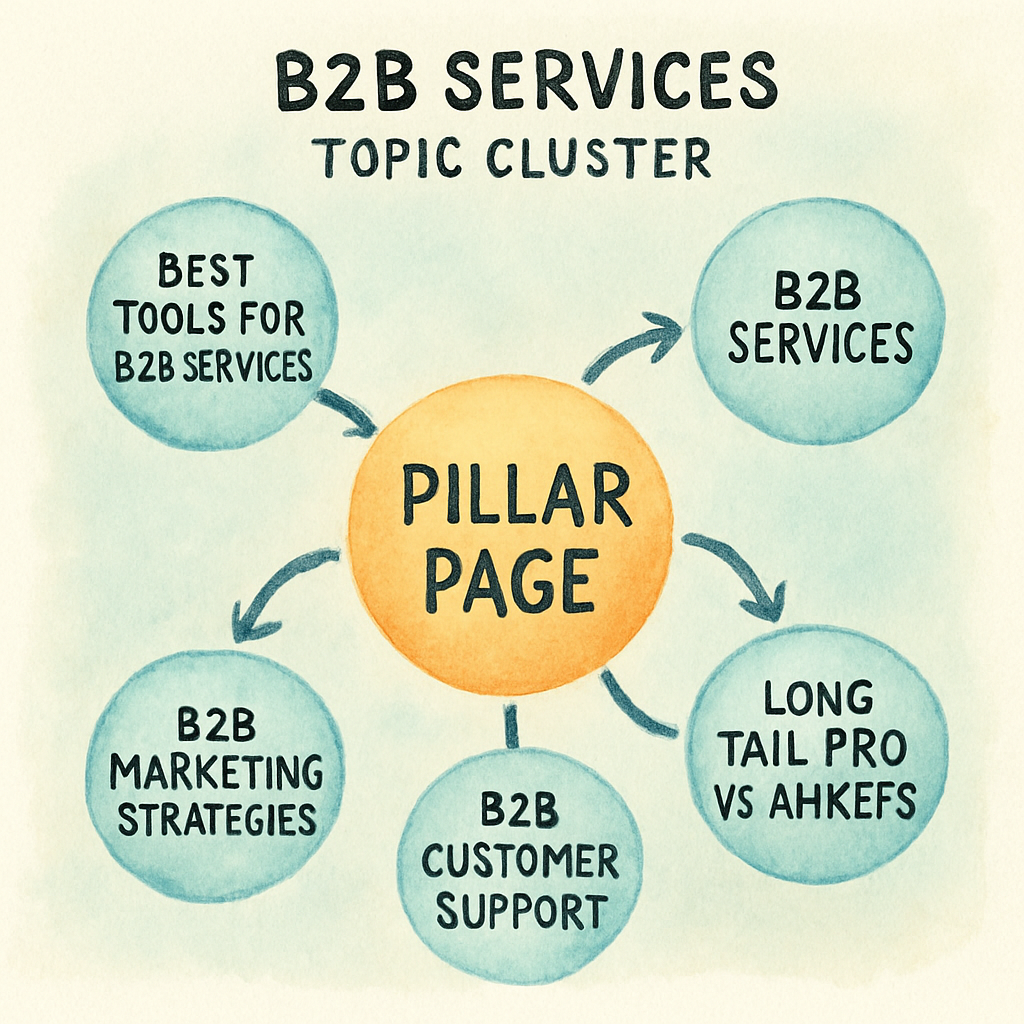
Example 5: B2B Services Topic Cluster
When you sell a service to other businesses, the buying journey feels like a marathon – not a sprint. You’ve probably noticed prospects start with vague questions and end up demanding a detailed proposal.
That’s why a B2B services topic cluster works so well: it lets you meet the buyer at every stage, from curiosity to commitment, without reinventing the wheel each time.
1. Choose a pillar that mirrors the core business challenge
Pick a high‑intent phrase that describes the problem you solve. For a cloud‑migration consultancy, “enterprise cloud migration checklist” makes a solid pillar. It promises a comprehensive resource that senior IT leaders actually search for.
2. Map out the funnel‑aligned sub‑topics
Break the pillar into three buckets – awareness, evaluation, and decision. Here are five real‑world cluster ideas that fit a typical B2B services firm:
- Awareness: “What are the hidden costs of moving to the cloud?” – a blog post that surfaces common budget surprises.
- Awareness: “Top 7 security myths about cloud migration” – a quick‑read listicle that busts misconceptions.
- Evaluation: “How to compare AWS, Azure, and Google Cloud for a mid‑size enterprise” – a side‑by‑side matrix.
- Evaluation: “Case study: Reducing downtime by 40% during a multi‑region migration” – a downloadable PDF.
- Decision: “The ultimate enterprise cloud migration checklist (2025 edition)” – the pillar page itself, downloadable and evergreen.
Notice how each title starts with a verb and promises a tangible outcome. That language nudges busy executives to click.
3. Wire internal links like a hallway of conference rooms
On every sub‑page, drop a link back to the checklist within the first two sentences. Then, sprinkle a couple of cross‑links to other cluster posts. For example, the “security myths” article should point to the “hidden costs” post and the checklist.
This web of anchors tells search engines that the pages belong together, and it guides readers through a logical narrative.
4. Sprinkle semantic search signals
Google now cares more about intent than exact keywords. By answering question‑based queries (“how do I secure data during cloud migration?”) you align with the semantic search model that modern B2B SEO relies on explained by StoryChief. Use natural language, include FAQs, and embed short video snippets if you have them.
When you phrase headings like “How to avoid downtime during a cloud move,” you capture both the exact phrase and the broader intent.
5. Add data‑driven proof points
Decision‑makers love numbers. Pull recent industry stats – e.g., “According to the 2024 Cloud Migration Survey, 62% of enterprises cite security as the top barrier.” Insert a simple bar chart or a quoted statistic to boost credibility.
Because the pillar is a living document, schedule a quarterly review to refresh the stats and add new sub‑topics as the market evolves.
6. Promote the cluster without extra effort
Once the pages are live, repurpose the checklist as a gated lead magnet in LinkedIn ads. The same content can become a slide deck for sales calls, or a webinar outline for nurturing prospects. That way, any link earned from a guest post or partner site automatically boosts the whole cluster’s authority.
7. Quick checklist before you launch
Before you hit publish, run through this quick sanity check to make sure nothing falls through the cracks.
- Define the pillar keyword and write a 2,000‑plus word checklist.
- Brainstorm 5‑7 sub‑topics that map to awareness, evaluation, and decision stages.
- Insert the pillar link in the first two sentences of each sub‑page.
- Add at least two cross‑links between sub‑topics.
- Include one data point or visual per article.
- Schedule a 30‑day performance review and update any lagging posts.
- Monitor CTR and average position; refresh low‑performers with new stats or a short video.
Follow these steps, and you’ll have a B2B services topic cluster that not only climbs the rankings but also feeds your sales pipeline with warm leads.
FAQ
What exactly are topic cluster examples and why should I care?
Topic cluster examples are real‑world blueprints that show how a single pillar page can be surrounded by a handful of tightly‑focused supporting articles. The idea is to let search engines see a clear hierarchy of authority while giving readers a one‑stop resource for every sub‑question they have. When you follow a proven example, you cut guesswork, speed up content planning, and boost the chances of ranking for both the broad keyword and its long‑tail variations.
How do I choose the right pillar topic for my niche?
Start by hunting for a high‑intent phrase that matches the biggest problem your audience is trying to solve. Look at search volume, competition, and how closely the term aligns with your core offering. Once you have a candidate, sketch a quick outline of the sub‑topics you could cover – the more angles you can address, the stronger the pillar becomes. Validate the idea by checking that at least a few of those sub‑topics already have search demand.
Can I reuse existing blog posts as cluster content?
Absolutely. Audit your current library, flag posts that already answer a specific question, and see if they naturally link back to a new or updated pillar page. You’ll often find that a well‑written how‑to or case study can become a cluster piece with a few tweaks – like adding the pillar link in the first two sentences and inserting a couple of cross‑links to related posts. This saves time and gives older content new SEO life.
What’s the ideal number of supporting articles in a cluster?
There’s no hard rule, but most successful examples hover around five to eight sub‑pages. That range provides enough depth to signal expertise without overwhelming your editorial calendar. If you’re just starting, aim for five solid pieces; as you gain momentum, you can expand to cover more niche queries. The key is quality and relevance – a cluster of ten thin articles won’t perform as well as five in‑depth, data‑rich posts.
How often should I audit and refresh my topic clusters?
Set a recurring review every 30 to 60 days, especially for fast‑moving industries. Check each article’s rankings, click‑through rates, and time‑on‑page. If a post is slipping, update the stats, add a fresh visual, or rewrite a paragraph to reflect new trends. Don’t forget the pillar page – it should be a living document that incorporates the latest data and links to any newly created cluster articles.
Do topic clusters really improve rankings for small businesses?
Many small teams report noticeable lifts after implementing clusters because the structure consolidates link equity and signals topical authority to Google. Even if you only have a modest backlink profile, the internal linking web helps search crawlers discover and index your content faster. In practice, you’ll often see the pillar climb into the top‑three positions while the supporting articles start pulling long‑tail traffic that previously went unnoticed.
What tools can help me build and visualize topic clusters without a big budget?
There are several lightweight options – from spreadsheet mind maps to free keyword‑research extensions that let you group related terms. If you prefer an all‑in‑one solution, Rebelgrowth’s automated content engine can generate a topical map, suggest pillar and sub‑topic titles, and even draft the first version of each article. The platform also tracks internal link placement, so you can see the whole hub‑and‑spoke network at a glance.
Conclusion
We've walked through a handful of real‑world topic cluster examples, from SaaS hubs to e‑commerce guides, and you’ve seen how a single pillar can pull a web of traffic toward you.
So, what does that mean for you right now? It means you already have the blueprint: pick a high‑intent pillar, spin out 5‑7 focused sub‑topics, and wire the links like a spider‑web. Simple, but surprisingly powerful.
Remember the tiny habit that made the biggest difference: add the pillar link within the first two sentences of every supporting post. That tiny placement tells Google, “these pages belong together,” and it tells readers, “you’re in the right place.”
And don’t forget to treat the pillar as a living document. Refresh the stats, add a new cluster when a fresh question pops up, and watch the rankings creep upward without a massive content overhaul.
Feeling a little overwhelmed? Grab a notebook, sketch your pillar headline, and list three sub‑topics you can draft this week. Even a rough outline gets the ball rolling.
When you’ve the map, the traffic will follow – it’s just a matter of taking the first step. Ready to turn those scattered ideas into a traffic‑magnet?
Start today, and let the clusters do the heavy lifting for you.