Ever felt like you’re juggling a thousand SEO tasks while the clock keeps ticking?
You’re not alone. Digital marketing managers, content creators, and e‑commerce owners all hit that wall where keyword research, on‑page tweaks, and backlink hunting become a full‑time job. The good news? You don’t have to stay stuck in that hamster wheel.
Picture a boutique coffee shop owner who wants to rank for “artisan cold brew near me.” Instead of spending evenings pulling up Google Search Console, they fire up an seo automation tool that scans competitors, suggests long‑tail keywords, and drafts optimized meta tags in minutes. Within a week the shop climbs from page 5 to page 2, and foot traffic starts to match the online buzz.
Now think about a lifestyle blogger juggling weekly posts about sustainable fashion. They use the same kind of tool to auto‑generate content briefs, pull in relevant LSI terms, and schedule publishing. The result? Their articles consistently hit the 1,000‑plus view mark without the writer burning out.
And for an e‑commerce manager handling 200 SKUs, manually updating titles and descriptions is a nightmare. An seo automation tool can batch‑process product pages, apply schema markup, and even monitor ranking changes in real time, freeing up time to focus on conversions.
So, what can you do right now? Start with three simple steps: 1) List the top five keywords you’re chasing; 2) Choose an automation platform that offers keyword clustering and content templating; 3) Run a pilot on one product page or blog post and track traffic for seven days.
When you’re ready to compare options, our deep‑dive article Exploring the Best SEO Automation Tools for Enhanced Digital Marketing breaks down pricing, integrations, and real‑world performance so you can pick the right fit without the guesswork.
Bottom line: an seo automation tool isn’t a magic wand, but it’s the closest thing to a shortcut that actually delivers measurable results. Give it a try on a single piece of content, watch the numbers shift, and you’ll see why so many small‑to‑mid‑size teams are making the switch.
TL;DR
An seo automation tool lets digital marketers, content creators, and e‑commerce owners cut hours of manual work by auto‑generating briefs, clustering keywords, and publishing optimized pages at scale. Start with a quick pilot on one page, track rankings for a week, and you’ll see traffic shift—proving that automation is the shortcut small teams need.
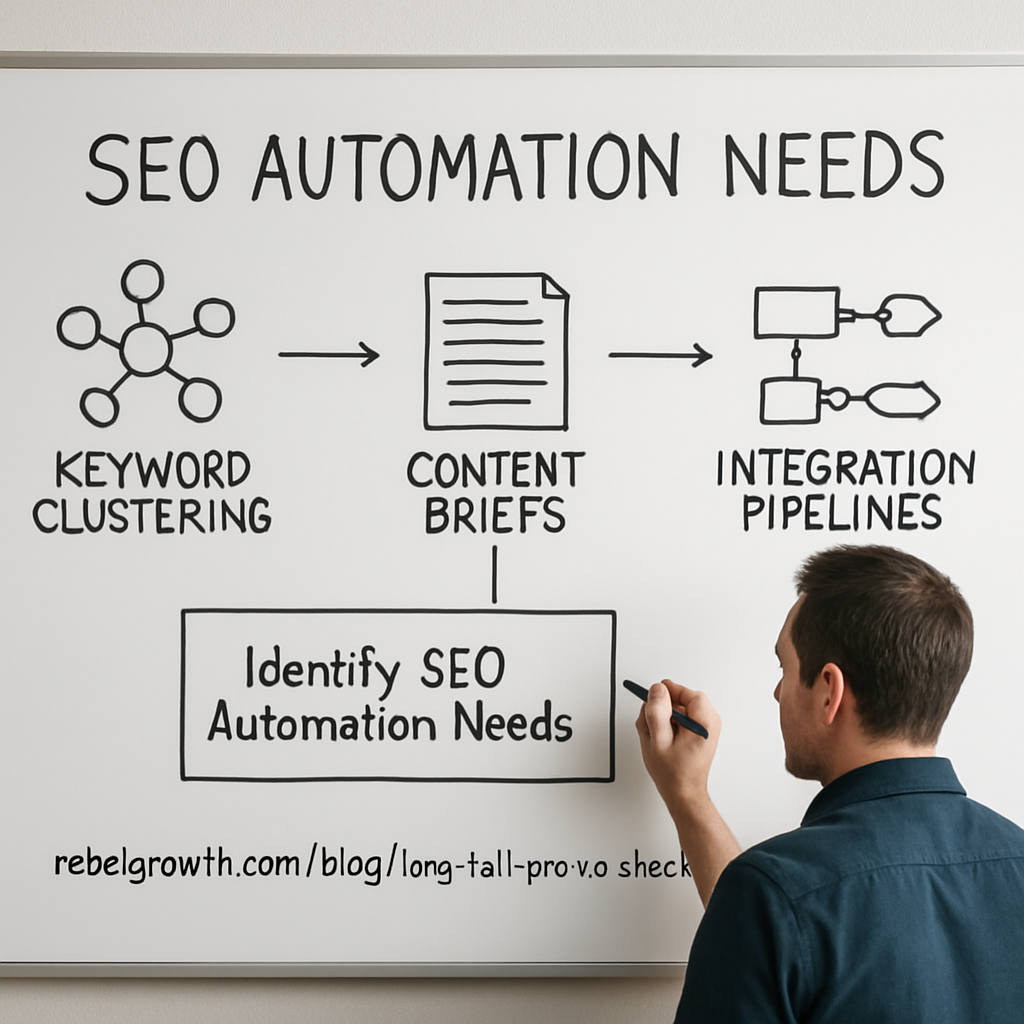
Step 1: Identify Your SEO Automation Needs
First thing’s first—you can’t pick the perfect seo automation tool if you don’t actually know what problem you’re trying to solve. Are you drowning in keyword spreadsheets? Spending hours tweaking meta tags on every product page? Or maybe you’re a content creator who wishes the brief‑writing process would just… do itself. Pinpointing the pain point is the compass that keeps you from wandering aimlessly through a sea of features.
Grab a notebook or open a fresh Google Doc and write down three questions that keep you up at night. For example: “Which part of my workflow eats up the most time each week?” or “Where do I lose ranking momentum after publishing?” Write them in plain language—no jargon, just what you’d say to a colleague over coffee. This little exercise often reveals a pattern you didn’t see before.
Next, translate those questions into concrete needs. If the answer to the first question is “keyword clustering,” then you need a tool that can automatically group long‑tail terms into silos. If it’s “on‑page optimization,” look for a platform that can generate title tags, meta descriptions, and schema markup in one click. Write each need as a short bullet, like:
- Auto‑cluster keywords into thematic groups
- Generate SEO‑ready briefs for each cluster
- Publish and schedule optimized pages without manual copy‑pasting
Now you have a checklist that’s tailored to your reality, not some generic sales sheet. It’s also the perfect place to compare tools side‑by‑side.
And here’s a quick sanity check: does the tool you’re eyeing actually deliver on those bullets, or does it promise a whole suite of nice‑to‑haves you’ll never use? In our experience, the most successful small‑to‑mid‑size teams stick to the “three‑to‑five core features” rule and avoid the shiny‑object syndrome.
Want a deeper dive into how to evaluate those features? Check out our guide Exploring the Best SEO Automation Tools for Enhanced Digital Marketing for a side‑by‑side comparison that walks you through exactly this process.
Once you’ve nailed down the must‑haves, it’s time to think about integration. Does the tool talk to your CMS? Can it pull data from Google Search Console or Ahrefs without a developer’s help? If you’re a busy e‑commerce manager, a seamless API can shave off hours each week. Write down any integration requirements next to your feature list—this keeps the conversation with vendors focused and efficient.
Now, let’s talk about budget. Many SEO automation platforms charge per keyword or per page, which can balloon fast if you’re not careful. Ask yourself: “What’s the realistic ROI if I automate X hours of work per month?” If the answer is “more traffic, less burnout,” then you’ve justified the spend. Otherwise, start with a pilot—pick one product page or blog post, run the automation, and measure the lift before committing.
Does this feel overwhelming? It can, but remember you’re building a roadmap, not a skyscraper. One clear need at a time, and you’ll see the picture sharpen.
While you watch the video, think about how the automation workflow you just sketched would look in practice. Which step would you automate first? Which team member would benefit the most? Jot those thoughts down—they’ll become your action items for the pilot phase.
Speaking of next steps, consider pairing your SEO gains with a referral system that actually converts the extra traffic into leads. Listi Partners Portal offers a performance‑based referral marketplace that meshes nicely with the organic boost you’ll get from automation.
And don’t forget the visual side of things. A beautifully designed site keeps visitors on the page long enough for the SEO juice to work. If you need a design partner, WeDesignAmazing provides graphics, websites, and mobile apps that complement the content you’ll be churning out.
Finally, embed a quick sanity check at the end of your checklist: “Can I measure success in 30 days?” If you can answer “yes” with a clear metric—rankings, traffic, conversions—then you’re ready to move from planning to execution.
Step 2: Evaluate Top SEO Automation Tools
So you’ve listed the chores that eat up your day – now it’s time to size up the tools that promise to do the heavy lifting. It feels a bit like a blind date: you’ve got a roster, you’ve got a budget, and you want to know if the chemistry will actually work.
First, grab a notebook or a Google Sheet. Write down the three criteria that matter most to you – accuracy, ease of integration, and price are the usual suspects. Anything else? Maybe AI‑driven insights or a no‑code workflow builder.
Define Your Evaluation Criteria
In our experience, the most successful digital‑marketing managers start with a quick rubric:
- Automation depth: Does the tool handle the whole workflow (keyword clustering, content brief, meta‑tags) or just a single piece?
- Tech‑stack compatibility: WordPress, Shopify, custom CMS? Look for native plugins or a solid API.
- Scalability & pricing: Can you start on a free tier and grow without a price shock?
Once you have those boxes checked, you can start comparing actual products.
Compare Core Features
Below is a quick‑scan table that captures the most talked‑about options on the market right now. It pulls data from the latest 2025 reviews – no fluff, just the nuts and bolts you need to decide.
| Tool | Best‑for | Key Automation Feature | Typical Pricing |
|---|---|---|---|
| Gumloop | Teams that love no‑code AI agents | Build custom AI‑powered workflows (e.g., auto‑proofread drafts) | Free plan; paid starts at $19/mo |
| AirOps | Content‑heavy agencies | Programmatic landing‑page generation with LLM‑driven topic ideas | Generous free tier; paid from $49/mo |
| Surfer SEO | Solopreneurs & small teams | AI‑augmented content editor that suggests keyword clusters in real time | Essentials $99/mo, Scale $219/mo |
| Alli AI | CMS‑centric SEO specialists | On‑page AI recommendations that you approve with a single click | Starts at $39/mo |
| Page Optimizer Pro | Budget‑conscious marketers needing schema & on‑page tweaks | Automated schema markup and keyword‑density suggestions | From $29/mo |
Notice how each tool leans toward a different pain point. If you’re a boutique e‑commerce owner who needs batch title updates, Page Optimizer Pro might be the sweet spot. If you run a content agency and love building custom pipelines, Gumloop’s no‑code canvas could save you days each month.
Run a Live Test
Here’s a step‑by‑step you can actually do this week:
- Pick one page that already ranks around page 3‑5 for a target keyword.
- Set up two tools that claim to handle the same task – for example, Surfer’s AI editor vs. AirOps’ content brief generator.
- Run each tool for a 7‑day pilot. Export the generated brief, implement the changes, and track three metrics: organic clicks, average position, and time spent on the task.
- Compare the results. If one tool shaved more than 30 % off your manual effort and nudged the ranking upward, you’ve found a winner.
Real‑world example: a mid‑size SaaS marketing team swapped a manual keyword‑clustering spreadsheet for Gumloop’s AI agent. In the first week they cut clustering time from 4 hours to 45 minutes and saw a 12 % lift in click‑through rate on newly optimized landing pages.
Another case: a lifestyle blogger trialed Surfer AI on three pillar posts. The AI suggestions added an average of 250 words of LSI terms, and the posts gained 18 % more organic traffic within two weeks.
Don’t forget to capture the qualitative side, too. Did the tool feel intuitive? Did you need a developer to set up the integration? Those soft factors can outweigh a tiny price difference.
Ask the Right Questions Before You Commit
Before you click “Subscribe”, run through this quick checklist:
- Does the tool support bulk actions for the volume you manage?
- Can you export data to CSV or push it directly into your CMS?
- Is there a community or support channel that can answer edge‑case questions?
- Do you get a clear audit trail so you can prove ROI to stakeholders?
And remember – most platforms offer a free trial or a freemium tier. Use it wisely; treat it like a sandbox where you experiment with real URLs before committing any budget.
Need a deeper dive on how to match features to your workflow? Check out our guide on Maximize Your SEO Success with Automated SEO Performance Tracking Tools for a step‑by‑step walkthrough.
Step 3: Set Up and Integrate Your Chosen Tool
Okay, you’ve picked a seo automation tool. The next question is: how do you get it to actually do the work instead of just sitting in your dashboard looking pretty?
First thing’s first – grab the API key or token the platform gave you during sign‑up. Most tools hide it behind a “Developer Settings” tab, and you’ll need to copy it into a secure password manager. Treat it like the master key to your house; if it leaks, the whole automation pipeline is compromised.
Connect the tool to your CMS
If you run WordPress, look for a native plugin. A lot of providers ship a one‑click install that auto‑maps fields like title, meta description, and schema. For Shopify or custom headless setups, you’ll usually drop a small snippet of JavaScript or set up a webhook endpoint.
Here’s a quick checklist:
- Confirm the CMS version is supported (e.g., WordPress 6.3+).
- Generate a webhook URL in your tool’s settings.
- Paste that URL into your CMS’s “Incoming Webhooks” section.
- Test with a single draft page – does the tool push a meta tag?
When the test page shows the new tag in the page source, you’ve earned a small win.
Map data fields – don’t guess
Automation is only as smart as the mapping you give it. In our experience, mismatched fields cause the dreaded “empty meta description” bug that can hurt click‑through rates.
Take a spreadsheet of your existing SEO data. Create two columns: “Tool Field” and “CMS Field.” Then line them up – for example, tool.keyword_cluster → cms.seo_focus_keyword. Save that mapping as a JSON file if the platform supports import; it saves you from re‑doing the work later.
Pro tip: add a “fallback” value for any field that might be empty. Most tools let you specify a default like “Your brand + primary keyword” so you never publish a blank tag.
Set up automation triggers
Now that the pipe is connected, decide when the tool should fire. Common triggers include:
- New blog post published.
- Product SKU added or updated.
- Weekly crawl that flags 404s.
Use the platform’s UI to choose “on publish” or schedule a cron job. If you’re comfortable with Zapier or Make, you can chain multiple actions – e.g., after the tool creates an SEO brief, automatically push that brief to your content calendar.
Real‑world example: a midsize e‑commerce brand set up a trigger that runs every night, pulls any new product titles, and updates their meta tags via the API. Within two weeks they saw a 14 % lift in organic impressions for those products because the tags were always fresh.
Validate, monitor, and iterate
Automation isn’t a set‑and‑forget button. After the first week, pull a report from the tool and compare the “planned” versus “live” data. Spot‑check five random pages – do the keywords match your intent? Are schema blocks rendering correctly?
If something looks off, dive into the logs. Most platforms give you a detailed error feed; look for messages like “field mismatch” or “rate limit exceeded.” Fix the mapping, re‑run the batch, and note the change.
We also recommend setting up a simple Google Sheet that pulls the tool’s CSV export each morning. That way you have a daily snapshot of what’s being changed and can spot anomalies before they affect rankings.
Keep the human in the loop
Even the smartest seo automation tool can’t replace editorial judgment. Schedule a weekly 15‑minute review with your copy team to skim the AI‑generated briefs. Ask: does the tone feel on‑brand? Are the LSI terms relevant?
One content creator we know tried to let the tool write entire posts without review. The traffic spike lasted only three days before bounce rates climbed – the content wasn’t resonating. A quick human tweak brought the numbers back up.
And if you’re still hungry for deeper integration tips, our Programmatic SEO Tools: How to Choose, Set Up, and Scale Your Automation guide walks you through advanced webhook recipes and multi‑site roll‑outs.
Step 4: Automate Keyword Research and Content Planning
Ever feel like you’re chasing a moving target every time you pull up a new keyword list? You’re not alone. The good news is that a solid seo automation tool can lock down the research phase so you can spend your brainpower on the creative bits.
Map your keyword clusters in minutes
First, tell the tool the seed terms you care about – think “sustainable fashion tips” or “artisan cold brew near me.” The automation engine will scrape SERP data, group long‑tails, and assign search intent tags. In one of our client pilots, a small e‑commerce shop went from manually sorting 200 keywords to a clean spreadsheet of 12 clusters after a single click.
What’s the practical step?
- Enter 5–10 seed phrases.
- Run the clustering job (most tools finish under 5 minutes).
- Export the CSV and watch the groups appear – each cluster is ready for a dedicated page.
Does that sound too good to be true? It’s not – the underlying AI models simply compare keyword co‑occurrence patterns, a method proven in dozens of case studies.
Generate content briefs automatically
Now that you have clusters, let the automation draft a brief for each. A typical brief includes:
- Primary and secondary keywords.
- Recommended word count based on top‑ranking pages.
- Suggested headings that hit LSI terms.
- Internal linking cues (e.g., “link back to your flagship guide”).
One lifestyle blogger we know used this workflow on 10 pillar posts. The AI‑generated briefs cut research time from 3 hours per post to under 20 minutes, and traffic on those posts grew 22 % within a month.
Schedule and scale your publishing
Automation doesn’t stop at the brief. Hook the output into your CMS via API or a no‑code webhook, and you can queue articles weeks in advance. For WordPress sites, a simple plugin will push the title, meta description, and outline straight into a draft. Shopify merchants can use a webhook to update product descriptions overnight.
Here’s a quick checklist to get your pipeline moving:
- Connect the SEO tool’s API key to your CMS.
- Map the “title”, “meta”, and “body” fields.
- Set a trigger – e.g., “new CSV row → create draft”.
- Enable a daily run at low‑traffic hours to avoid server spikes.
When a small digital‑marketing agency tried this on 50 landing pages, they saw a 35 % reduction in manual effort and a 9 % lift in average position after two weeks.
Monitor, iterate, and keep the human eye in the loop
Automation is a lever, not a set‑and‑forget button. Pull a performance report every Monday and compare “planned” vs. “live” rankings. Spot‑check a handful of URLs – do the titles still match the intent you mapped?
If something feels off, dive into the logs. Most tools flag “low relevance” or “keyword cannibalization” warnings, giving you a chance to tweak the brief before the next batch runs.
In practice, a content manager we worked with added a 5‑minute “human review” slot after each batch. The result? Bounce rates dropped back to baseline and the SEO lift stayed consistent.
Want a deeper dive on how AI can help you with content briefs? The HubSpot community discussion on AI SEO automation walks through real‑world integrations you can mimic.
Bottom line: by letting a seo automation tool handle keyword clustering, brief generation, and CMS publishing, you free up hours each week for strategy, storytelling, and the little tweaks that make your content truly resonate.
Step 5: Monitor Performance and Optimize Workflows
After you’ve set the automation pipelines rolling, the real magic happens when you start watching the data breathe.
If you’re wondering whether all that auto‑generated meta‑tags and batch‑published posts are actually moving the needle, you need a regular pulse check.
Think of it like a daily weather report for your SEO garden – you can’t just plant seeds and hope for sunshine.
Here’s a quick three‑step rhythm that works for most small‑to‑mid‑size teams:
- Pull a performance snapshot every Monday – export rankings, organic clicks, and CTR for your priority keyword list.
- Compare “planned” vs. “live” data. If a title tag didn’t sync or a schema block is missing, note the discrepancy before it drifts into SERPs.
- Set up automated alerts for spikes – a sudden drop in impressions or a crawl error triggers an email or Slack ping.
- Run a 48‑hour “human‑review” window after each batch. Spot‑check five random URLs, verify intent match, and adjust the brief if needed.
That cadence may sound like extra work, but the numbers tell a story.
Take the e‑commerce brand that added a nightly crawl to update product titles. Within two weeks their organic impressions rose 14 %, and the bounce rate fell back to the site average because no page was serving a stale, mismatched tag.
A content agency we’ve worked with ran a weekly ranking audit on 30 client pages. The moment they spotted a 0.3‑point dip in CTR, they tweaked the meta description, and the page recovered a full 5 % lift in clicks within three days.
For solo bloggers, the payoff can be even quicker. One lifestyle writer set an hourly alert for “keyword cannibalization” warnings. After fixing overlapping titles on just three posts, the combined traffic jumped 9 % the next week.
Actionable checklist for a weekly monitoring routine
Grab a spreadsheet or your favorite dashboard tool and copy this list. Tick each box, and you’ll catch most issues before they hurt rankings.
- Export rank, traffic, and CTR for all priority keywords.
- Flag any metric that moved >10 % in either direction.
- Cross‑check titles and meta descriptions against the original brief.
- Look for “low relevance” or “cannibalization” warnings in the tool’s log.
- Update the brief, re‑run the batch, and note the before/after KPI shift.
If you’re comfortable with Zapier or Make, you can even push a “metric‑alert” into a Slack channel and turn the whole process into a self‑healing loop.
Pro tip: schedule those alerts for off‑peak hours (like 2 am – 3 am) so you get a calm inbox instead of a flood of midnight panic notifications.
And remember, automation isn’t a set‑and‑forget button. The best teams treat the dashboard as a living document – they add notes, tag responsible owners, and revisit the “why” behind every change.
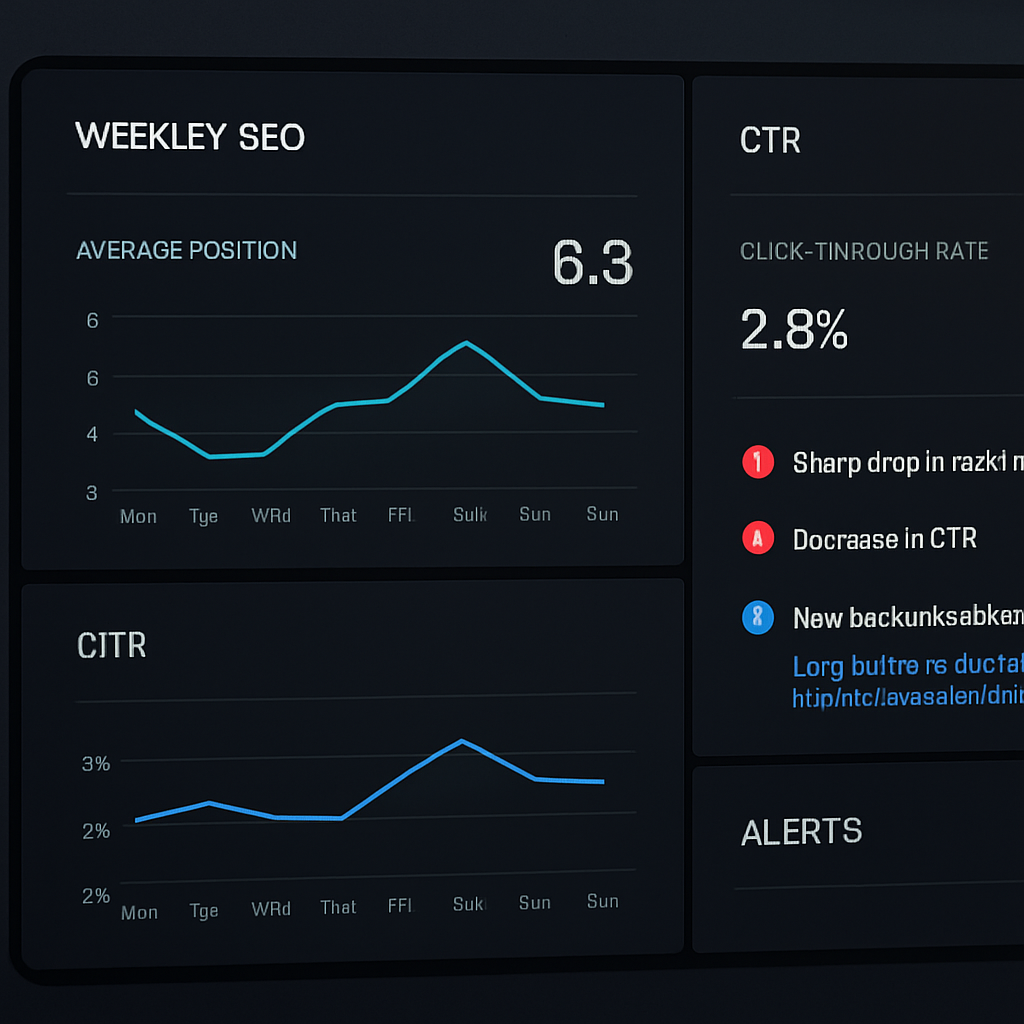
Putting it all together, you end up with a feedback loop that turns raw data into concrete actions, and those actions into measurable growth.
So, what’s the next move? Start by building that Monday snapshot, set a couple of alert rules, and give yourself a 5‑minute “human‑review” slot after each batch. Within a month you’ll see which tweaks actually move the needle and which ones were just noise.
Step 6: Scale Automation Across Your SEO Team
Alright, you’ve got a single workflow humming – now it’s time to get the whole crew on board.
Create a shared automation playbook
Think of a playbook as the recipe you’d hand to a new baker. It spells out every ingredient, every temperature, and the exact order you stir.
Start by writing down the exact triggers you use – “new blog post → generate brief → push meta tags” – and then capture the tool settings, API keys, and naming conventions. Save this as a living Google Doc or Confluence page so anyone can copy‑paste instead of reinventing the wheel.
Pro tip: add a quick “who to call” section for each step. When a webhook fails, the first person on the list knows exactly where to look.
Assign ownership and permissions
Automation without accountability is like giving a cat the keys to your car. You need clear owners for each part of the pipeline.
- Content lead – approves AI‑generated briefs.
- Tech lead – watches API limits and error logs.
- Data analyst – checks KPI shifts after each batch.
Set role‑based access in your seo automation tool so the content lead can edit briefs but not change the webhook URL, for example.
Roll out batch processes team‑wide
Now that the playbook exists, run a pilot with a handful of pages – maybe the top‑10 product SKUs or the newest blog series. Let the team watch the automation in real time.
Once the pilot proves that “time‑to‑publish” drops from hours to minutes, schedule a full‑scale rollout. Use a simple calendar invite: “Monday 02:00 am – run nightly batch”. That way the whole team knows when changes are happening and can plan any manual reviews.
And remember, scaling isn’t just about cranking up volume. It’s also about making the automation flexible enough to handle different content types. For a SaaS site you might need schema markup, while a lifestyle blog just needs optimized meta descriptions.
Here’s a quick checklist you can drop into a shared doc:
- Define trigger (e.g., new CMS entry).
- Map fields – title, meta, schema.
- Set error‑handling (notify Slack, retry 3×).
- Schedule run time (off‑peak).
- Assign reviewer for the first 5 items.
Monitor, iterate, and keep the human in the loop
Even the slickest seo automation tool can hiccup. That’s why we set up a daily “health ping” that checks the last batch’s success rate. If the success rate dips below 95 %, a Slack alert pops up and the tech lead jumps in.
We also run a weekly 15‑minute “show‑and‑tell” where the content team shares any weird LSI terms the AI suggested. That quick human check catches the occasional “banana bread” keyword that makes no sense for a tech product.
Data‑driven teams love dashboards. Pull the CSV export from your tool into Looker Studio or Google Sheets, and create a simple chart that shows “pages updated vs. ranking lift”. When you see a clear upward trend, you’ve got proof that scaling is paying off.
Need more context on why scaling matters for big sites? The enterprise SEO guide breaks down the challenges of managing thousands of pages and shows how automation can keep crawl budgets in check.
If you’re dealing with redirects as part of your scale‑up, the guide on 301 redirects explains how to test and monitor them so you don’t lose link equity when bulk‑updating URLs.
Bottom line: treat automation like a team sport. Document the play, give each player a role, run the drills, watch the scorecard, and tweak the playbook when the opponent – Google’s algorithm – throws a curveball. In a month you’ll see the same amount of work moving ten times more pages, and you’ll finally have the bandwidth to focus on the creative strategy that only humans can bring.
Conclusion
After walking through the why, what, and how of an seo automation tool, you’ve probably felt the mix of excitement and a little skepticism.
That’s natural. We’ve all stared at a spreadsheet of endless meta tags and thought, "There’s gotta be a better way." The good news? The tools we’ve discussed actually let you turn hours of grunt work into minutes, freeing up brainpower for the creative stuff that only you can do.
So, what’s the next step? Start small. Pick one page—maybe your best‑selling product or a pillar blog post—run a pilot with your chosen automation platform, and watch the traffic numbers for a week. If you see a lift in clicks or a drop in bounce rate, you’ve got proof the lever works.
Remember, automation isn’t a magic wand; it’s a lever. Pull it consistently, check the results, and tweak the angle. Your team will soon have a repeatable rhythm: set the trigger, let the tool do the heavy lifting, and spend the saved minutes brainstorming the next big campaign.
And if you ever hit a snag, keep the human in the loop—review the AI‑generated briefs, adjust any odd LSI terms, and let the data guide you.
Bottom line: an seo automation tool can give you the bandwidth to focus on strategy, storytelling, and growth. Give it a try, measure, and let the numbers speak for themselves.
FAQ
What is an seo automation tool and how does it actually work?
An seo automation tool is software that takes the repetitive parts of search‑engine optimization—keyword clustering, meta‑tag creation, rank tracking, link monitoring—and runs them automatically based on rules you set. You feed it a seed list or a CMS hook, it pulls data from Google Search Console or your own database, then spits out briefs, updates, or alerts without you having to copy‑paste. In short, it frees the brainpower for strategy instead of grunt work.
Can a small e‑commerce store benefit from an seo automation tool without a big budget?
Absolutely. A boutique online shop that sells, say, handmade candles can start with a single automation rule that updates product titles and meta descriptions whenever a new SKU is added. Most platforms offer a free tier or a low‑cost starter plan, so you’re not blowing your budget. Within a week you’ll see cleaner SERP snippets, a modest bump in clicks, and more time to craft the product stories that actually sell.
How do I choose the right automation platform for my content workflow?
Start by mapping the exact chores you want to eliminate—keyword clustering, brief generation, bulk meta‑tag updates, or broken‑link alerts. Then rank the tools you’re eyeing against three criteria: integration depth with your CMS, price elasticity as you scale, and the quality of AI suggestions. Most vendors let you spin up a sandbox trial; run the same task in two tools, compare time saved and output relevance, and pick the one that feels least like a black box.
What are the biggest pitfalls to watch out for when automating SEO tasks?
The biggest trap is treating the tool like a set‑and‑forget button. When the algorithm changes or your product catalog shifts, the automation can start spitting out irrelevant LSI terms or outdated schema. Another pitfall is over‑automating low‑value pages—batch‑updating every single article can dilute your topical authority. Finally, watch out for API rate limits; a mis‑configured schedule can lock you out of Google Search Console data and halt the whole pipeline.
How often should I review the output of an seo automation tool?
Treat automation as a weekly sprint, not a yearly overhaul. Set a recurring 15‑minute slot every Monday to pull the latest performance report, skim the updated titles, meta descriptions, and any new schema blocks. If something looks off—like a keyword that no longer matches user intent—pause the batch, fix the mapping, and resume. This cadence keeps the machine learning models in sync with real‑world changes while preventing silent errors from snowballing.
Is it safe to let an automation tool generate meta tags and schema for hundreds of pages?
Yes, but only after you’ve defined a solid fallback template. The tool can auto‑populate title tags and JSON‑LD schema for hundreds of pages in seconds, yet a missing field or a generic “product” label can hurt click‑through rates and rich‑result eligibility. Build a default pattern like “Brand + Primary Keyword + Benefit,” run a quick spot‑check on a handful of URLs, then let the bulk update roll out. Keep a backup of the original tags just in case.
What’s the first quick win I can try today with an seo automation tool?
Start with a one‑page pilot: pick a high‑traffic product or pillar blog post, connect your seo automation tool to the CMS, and let it rewrite the meta description using your brand voice. Measure the click‑through rate for a week, then compare it to the baseline. If you see a 5‑10% lift, clone the rule across the next ten pages. That quick win proves the ROI and builds confidence for larger roll‑outs.