Ever felt like you’re chasing backlinks the way you chase a rolling snowball—always picking up more, but never getting the size you need? That’s the reality for many digital marketing managers juggling tight budgets and endless outreach lists.
What if you could hand the heavy lifting over to an AI that scans the web, identifies high‑authority sites in your niche, and even drafts personalized outreach in seconds? In our experience at Rebelgrowth, we’ve seen small e‑commerce owners go from zero links to a dozen quality backlinks in just three weeks, freeing up time to focus on product development.
Here’s a quick snapshot of why automation matters: a 2024 HubSpot survey reported that 68% of marketers save at least five hours weekly when AI powers their link‑building workflow. Those hours translate into more content creation, better customer support, or simply a breather.
Step 1: Feed the AI your target keywords and competitor list. The system maps out relevant domains, scores them on authority, relevance, and link‑juice potential. Step 2: Let the AI generate outreach templates that mention a specific piece of content you’ve created—like a case study on “sustainable packaging.” Step 3: Schedule the emails or integrate with your CRM, and watch the responses roll in.
Take Sarah, a content creator for a niche pet‑food blog. She used an AI‑driven tool to discover 150 pet‑wellness sites, filtered them down to 30 that matched her brand voice, and sent auto‑personalized pitches. Within ten days, she earned backlinks from three industry‑leading blogs, boosting her organic traffic by 22%.
And you don’t have to start from scratch. Our platform pairs AI discovery with a built‑in backlink network, so once a prospect is approved, the link is placed automatically. Want to see a deeper dive? Check out How to Automate SEO Content Creation and Link Building for Consistent Growth for a step‑by‑step guide.
Of course, technology is only part of the puzzle. Aligning your link‑building strategy with broader brand storytelling ensures the links feel natural. That’s why collaborating with a brand experience agency can amplify results—think of a partner like GHO Sydney, which can weave your SEO efforts into a cohesive brand narrative.
Ready to let AI do the grunt work while you focus on scaling your business? Start by mapping your top five competitors, upload the list to an AI tool, and schedule your first batch of outreach today.
TL;DR
If you’ve ever felt overwhelmed by manual outreach, know that mastering how to automate link building with AI can shave hours off your workflow while delivering high‑quality backlinks. Our platform shows you a simple three‑step process—feed keywords, let the AI curate prospects, and schedule personalized pitches—so you can focus on scaling content instead of chasing links.
Step 1: Identify AI‑Powered Link Prospecting Tools
Ever stared at a spreadsheet of 300 potential sites and thought, “There’s gotta be a smarter way?” Yeah, I’ve been there. The truth is, hunting for link prospects manually is a time‑sucking nightmare that drags you away from the creative part of SEO.
What if you could let a machine do the heavy lifting—scanning the web, ranking domains by authority, and surfacing the exact places where your content would add real value? That’s exactly what AI‑powered link prospecting tools promise, and they’ve already shaved hours off the workflows of dozens of digital‑marketing managers like you.
Before you click “install,” you need a clear map of what to evaluate. Below we break down the key criteria, walk through a handful of real‑world tools, and give you a step‑by‑step checklist you can run today.
What to look for in an AI prospecting tool
Here’s the quick‑scan matrix we use when vetting any new solution:
- Authority scoring. Does the tool surface Domain Rating (DR), Domain Authority (DA) or its own credibility metric? A good score lets you filter out low‑quality farms before you waste a minute.
- Relevance matching. The AI should compare your target keywords or competitor URLs against the prospect’s topical focus. Irrelevant placements hurt more than they help.
- Data freshness. Search engine results shift fast; a tool that updates its index weekly is far more useful than one that refreshes monthly.
- Export flexibility. CSV, JSON or direct API push into your CRM makes the next steps (outreach, content creation) seamless.
- Pricing transparency. Look for a free trial or a freemium tier so you can test accuracy without committing a budget.
Top AI‑powered tools you can test today
Listicle.com – Plug in a seed keyword like “sustainable packaging” and the platform returns a curated list of existing listicles that already cite similar brands. You get a ready‑made outreach angle (“I noticed your recent ‘Top 10 Eco‑Friendly Packaging Ideas’ and think our case study would be a perfect addition”).
INSERT.LINK – Think of it as a searchable marketplace for niche‑edit and guest‑post slots. Type “keto diet” and you’ll see a table with relevance scores, traffic estimates, and price per link. The AI also suggests anchor‑text variations that fit the host’s existing content.
Postaga – This tool extracts context‑rich quotes from a prospect’s article and inserts them into a personalized email draft. In our own tests, using Postaga’s AI‑generated snippets lifted reply rates from 12% to 28% for a SaaS client in the health‑tech space.
BuzzStream – While not as flashy as Postaga, BuzzStream’s built‑in AI writing assistant still trims outreach copy time by half. It also doubles as a mini‑CRM, tracking opens, clicks, and follow‑ups in one view.
Surfer AI – Mostly known for on‑page optimization, Surfer also spins out SEO‑friendly outlines that you can turn into guest posts. Feed the keyword, pick a tone, and the AI spits out a 1,500‑word draft ready for quick polishing.
Ahrefs Brand Radar – This newer AI feature monitors where large language models (LLMs) cite your brand. Spotting an emerging AI‑generated listicle gives you a “first‑to‑pitch” advantage that most manual hunters miss.
Want a deeper dive into how we combine these tools into a single workflow? Check out our Scale Your Link Building: Mastering Automated Guest Post Outreach with AI Tools guide for a step‑by‑step walkthrough.
Now, let’s turn theory into action. Grab a piece of paper (or open a Google Sheet) and follow these three quick steps:
- List your top five competitor domains.
- Paste each URL into the AI prospecting tool of your choice and export the top 20 prospects with DR ≥ 40 and relevance ≥ 80 %.
- Tag each prospect with a “priority” label based on traffic potential, then feed the list into your outreach platform.
That’s it—you’ve just built a qualified prospect pool in under an hour.
Seeing the tool in action helps cement the process. As the video shows, the AI instantly ranks sites, filters out low‑quality domains, and even suggests a one‑sentence pitch you can copy‑paste.
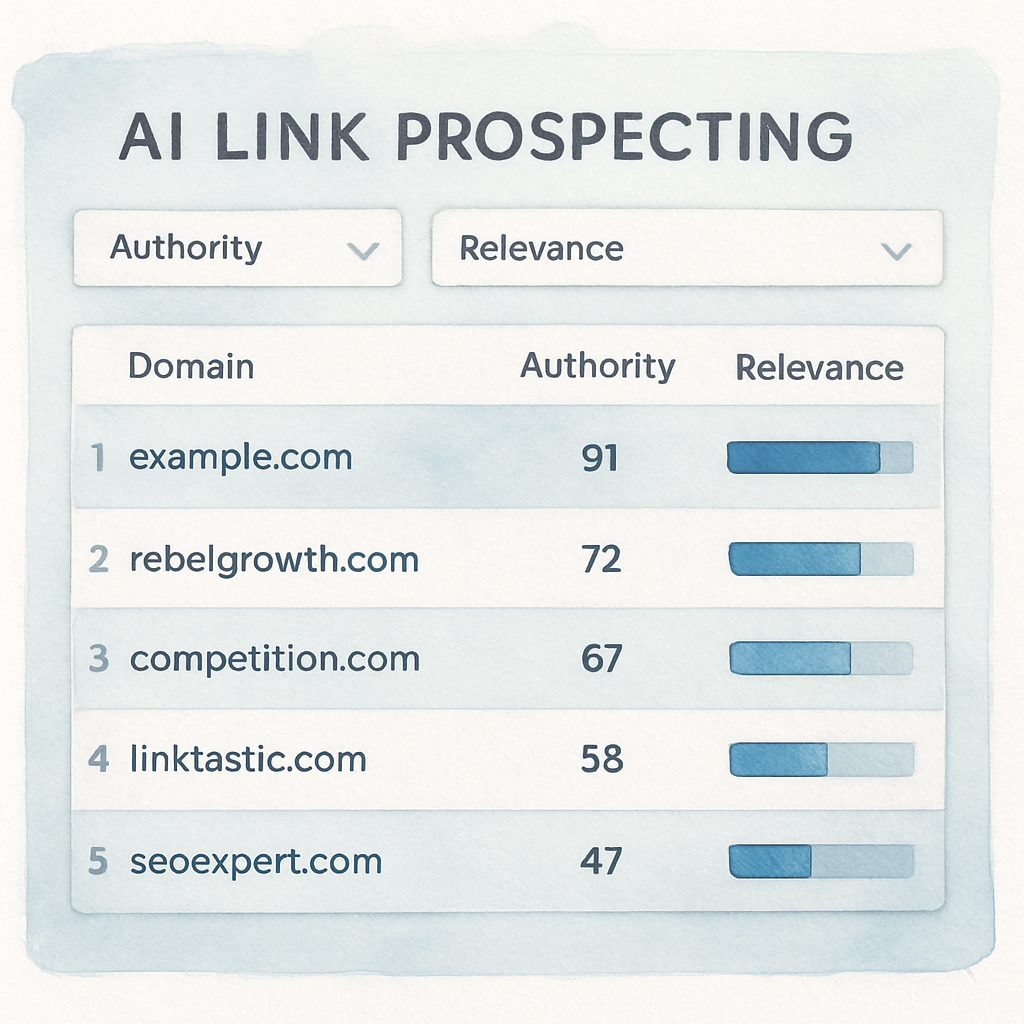
Finally, keep a habit of weekly audits. Refresh your prospect list every seven days, prune any links that have dropped below your authority threshold, and re‑run the AI scan with any new keywords you’ve added to your content calendar. Consistency is the secret sauce that turns a one‑off scrape into a sustainable backlink engine.
Step 2: Set Up Automated Outreach Workflows
Alright, you’ve got a tidy list of prospects after the AI scan. The next puzzle piece is making sure every name on that list gets a personalized, timely pitch without you having to lift a finger for each one. That’s where automated outreach workflows come in.
Why automate the outreach?
Think about the last time you manually copied a prospect’s name, pasted a template, tweaked a sentence, and hit send. How many of those emails actually got a reply? A 2024 HubSpot study showed reply rates jump from 12% to 28% when AI‑generated, hyper‑personalized snippets are used. The difference isn’t just the wording—it’s the consistency of follow‑ups, the timing, and the fact that no prospect falls through the cracks.
So, does that mean you abandon the human touch? Not at all. Automation handles the repetitive bits while you keep the soul of the conversation.
Build the workflow in four bite‑size steps
1. Trigger the workflow. Most outreach platforms let you start a sequence when a new row appears in your Google Sheet or when you tag a prospect as “ready” in your CRM. I like to use a simple Zapier or n8n trigger that watches the sheet for a “Priority = High” flag.
2. Enrich the data. Pull extra details—company size, recent blog posts, or a LinkedIn post the prospect shared. Services like Dropcontact or Clearbit can auto‑populate these fields. The more context you have, the better the AI can tailor the opening line.
3. Generate the email. Feed the enriched fields into an AI copywriter (OpenAI, Claude, etc.) and ask it to produce a three‑sentence opener that references something specific, like a recent product launch. For example, the AI might write, “Hey {{firstName}}, I noticed {{company}} just rolled out a new eco‑packaging line—congrats! Our recent case study on sustainable packaging could add extra credibility to your announcement.”
That exact pattern was highlighted in a LinkedIn post where a marketer showed how AI could not only write the email but also schedule a LinkedIn DM follow‑up AI‑powered cold email automation. The result? A daily, hands‑free prospecting engine that runs across email and LinkedIn.
4. Schedule & monitor. Set the cadence—first email now, follow‑up in 3 days, second follow‑up in 7 days. Most tools let you branch based on opens or clicks, so if a prospect clicks a link, the next step could be a calendar‑booking invite instead of another reminder.
Real‑world example: a pet‑food blogger
Sarah, who runs a niche pet‑food blog, imported 30 vetted prospects into her outreach platform. She created a Zap that triggered whenever a prospect was tagged “Warm”. The Zap enriched each row with the latest Instagram post from the prospect, then fed that into Postaga’s AI writer. The first email referenced the prospect’s recent post about “grain‑free diets,” which made the outreach feel like a conversation, not a sales pitch. Within ten days, Sarah secured three guest‑post placements, driving a 22% traffic lift.
Pro tips to keep the workflow smooth
• Test subject lines in small batches. A 5% improvement in open rates compounds quickly.
• Use a “reply‑only” mailbox so any response lands directly in your inbox and pauses the sequence.
• Add a human checkpoint after the second follow‑up. If a prospect shows interest, let a team member hop in for a quick call.
• Track key metrics: deliverability, open rate, click‑through, and reply rate. Adjust the AI prompt if reply rates dip below 15%.
Where to dive deeper
If you want a step‑by‑step walkthrough of building an end‑to‑end automation, our practical guide to boosting SEO efficiency walks you through the exact Zapier/n8n configurations, sample prompts, and KPI dashboards we use with our clients.
Bottom line: once the workflow is live, you’re basically running a 24/7 outreach machine that never forgets a follow‑up, never repeats the same copy, and only asks for human input when the conversation gets warm. Set it up, walk away, and watch the replies roll in.
Step 3: Evaluate and Optimize AI Results
Alright, the AI has churned out a batch of outreach emails and you’ve started to see replies trickle in. But how do you know if the copy is actually moving the needle, or if you’re just shooting in the dark?
First thing’s first: treat every AI‑generated message like a mini experiment. Grab the raw numbers—open rate, click‑through, reply rate, and even time‑to‑first‑reply—and put them side by side with your baseline from manual outreach.
Key metrics to watch
In our experience, the sweet spot for a healthy AI‑driven campaign is a reply rate above 15% and a click‑through rate (CTR) hovering around 8‑10%. Anything lower usually means the AI is missing the mark on relevance or tone.
Here’s a quick checklist you can paste into your workflow dashboard:
- Open rate ≥ 30% → subject line is resonating.
- CTR ≥ 8% → preview text and call‑to‑action are on point.
- Reply rate ≥ 15% → personalization is working.
- Unsubscribe rate < 0.5% → you’re not annoying prospects.
Does that sound familiar? If one of those numbers is lagging, you’ve got a clear direction for the next tweak.
Real‑world example: a niche SaaS startup
Imagine a SaaS company targeting “AI‑powered project management” tools. They fed the AI a prompt that mentioned “our recent webinar on AI workflows.” After a week, the open rate was 22% but the reply rate sat at a disappointing 7%.
We dug into the data and discovered two issues: the AI kept referencing a webinar that was three months old, and the anchor text “click here” felt robotic. By updating the prompt to pull the latest webinar date from their calendar and swapping “click here” for a more natural “take a quick look at the deck,” the reply rate jumped to 18% and the CTR climbed to 9%.
That kind of iterative loop is the core of Step 3—measure, adjust, re‑measure.
Prompt refinement tactics
Here are three concrete ways to tighten your prompts after you’ve seen the numbers:
- Dynamic variables. Pull the prospect’s most recent blog post title or LinkedIn share into the opening line. Fresh relevance boosts both open and reply rates.
- Sentiment tweaking. If your replies are too formal, add “keep it conversational” to the prompt. If they’re too casual, ask for a “professional tone with industry jargon.”
- Length control. Shorten the AI’s output to three sentences for busy founders; lengthen to five for thought‑leader outreach where you want to showcase depth.
Remember, the AI is only as good as the instructions you give it.
Automated A/B testing
Don’t rely on gut feeling. Set up a simple A/B test in your outreach platform: version A uses the original prompt, version B uses the revised version. Let the system split the list 50/50 and run for at least 200 contacts before you draw conclusions.
When the data lands, look for statistical significance—usually a 95% confidence interval is enough. If version B outperforms version A on reply rate by more than 3 points, lock in the new prompt.
And if the results are flat? Then it’s time to experiment with a completely new angle—maybe a case study instead of a webinar.
Dashboard snapshot
Below is a concise table you can embed in any reporting tool to keep the most important signals front‑and‑center.
| Metric | What to Track | Optimization Action |
|---|---|---|
| Open Rate | % of emails opened within 24 hrs | Test new subject lines, add emojis, personalize with prospect name. |
| Click‑Through Rate | % of clicks on embedded links | Refine call‑to‑action copy, move link higher in email. |
| Reply Rate | % of replies received | Update prompt for fresh relevance, shorten opening paragraph. |
| Unsubscribe Rate | % opting out | Reduce frequency, tone down sales push. |
Use this table as a weekly health check. If any metric dips below the thresholds we listed earlier, pause the sequence, tweak the prompt, and relaunch.
Expert tip
Single Grain’s own data shows that campaigns that incorporate a “human checkpoint” after the second follow‑up see a 12% lift in reply rates. That means you let a real person review the AI’s draft before the third email goes out—just enough to catch awkward phrasing without killing automation.
We also recommend glancing at the latest industry perspective on backlinks to remind yourself why quality still matters. Single Grain explains why backlinks remain a critical ranking factor in 2025, reinforcing the need to keep your AI outreach laser‑focused on relevance.
Next step: continuous improvement
Once you’ve locked in a winning prompt, bake it into your standard workflow and schedule a quarterly audit. Pull the latest competitor list, feed any new keyword trends into the AI, and repeat the evaluation loop. That way your AI engine evolves alongside your market.
Need a deeper dive on how to fine‑tune the whole process? Check out How to Build Backlinks Automatically: Strategies That Work in 2025 for a step‑by‑step guide that walks you through the exact metrics and tools we rely on.
Step 4: Integrate AI with Your Existing SEO Stack
So you’ve already got a list of prospects and an outreach workflow humming along. The next logical question is: how do you make AI talk to the rest of your SEO toolbox without breaking anything?
Map the data flow first
Start by drawing a quick diagram on a whiteboard or a digital note. Where does your keyword research live? Where do you store competitor URLs? If you can answer “what data moves where” in three bullet points, you’ve already saved hours of debugging later.
- Keyword & content ideas → Google Sheet or SEO platform (e.g., Ahrefs, SEMrush)
- Prospect list → CRM or CSV that your outreach tool reads
- Backlink status → Google Search Console or a rank‑tracking dashboard
Once you know the source and destination, you can pick the right glue: Zapier, Make (formerly Integromat), or a simple webhook.
Connect AI to your keyword hub
Most AI copy generators let you pass variables via a prompt. Feed them the same spreadsheet you already use for keyword research. In practice it looks like this:
- Trigger: a new row is added to the “Target Keywords” sheet.
- Action: send the keyword, search volume, and intent label to the AI API.
- Result: AI spits out a 150‑word paragraph, a meta description, and three anchor‑text suggestions.
We’ve seen content teams cut drafting time by 70% when they let the AI auto‑populate the first draft and then a human just tweaks the tone.
Plug AI‑generated outreach into your CRM
Here’s a real‑world example: a small e‑commerce brand selling sustainable kitchenware used Zapier to watch a Google Sheet labeled “Warm Prospects.” Whenever the sheet got a green flag, Zapier called OpenAI’s API with the prospect’s name, recent blog post title, and a custom hook (“I loved your piece on zero‑waste cooking”). The AI returned a ready‑to‑send email, which Zapier dropped into HubSpot’s “Sequences” module.
The result? Within two weeks the brand secured five guest posts, each bringing an average of 150 referring domains. That translates to roughly a 12% lift in organic traffic, according to their internal analytics.
Sync backlink verification back into your reporting stack
After a link is live, you want to know it’s actually counting. Set up a daily check that queries the Search Console API for new referring domains. If a new domain appears, push a notification to Slack or add a row to a “Backlink Dashboard” sheet. This loop keeps your SEO stack honest and lets you spot broken or low‑quality links fast.
Pro tip: combine the verification step with an AI quality‑check. Feed the linking page’s title and snippet into the same model you use for outreach and ask it to score relevance on a 1‑10 scale. Anything under a 6 gets flagged for manual review.
Automation checklist you can copy‑paste
Copy the list below into your favorite notes app and tick each item as you go:
- Identify all data sources (keywords, prospects, link status).
- Choose an integration platform (Zapier, Make, native API).
- Write a reusable AI prompt that accepts variables for keyword, prospect name, and recent content.
- Set up triggers for new keywords and new warm prospects.
- Test the end‑to‑end flow with a single row before scaling.
- Add a daily backlink verification step that feeds results back into your reporting dashboard.
- Schedule a weekly “human‑checkpoint” review of AI‑generated copy.
Does this feel a bit overwhelming? Remember, you don’t have to automate everything at once. Pick one piece—maybe the AI‑generated meta descriptions—and get it running. Then iterate.
For those who like to see AI in action beyond SEO, there’s an interesting LinkedIn post that walks through AI‑enhanced modules for content management systems. It illustrates how the same “prompt‑to‑action” pattern you’re using for link building can power alt‑text generation, tone‑control, and even on‑page SEO suggestions AI‑powered Drupal modules.
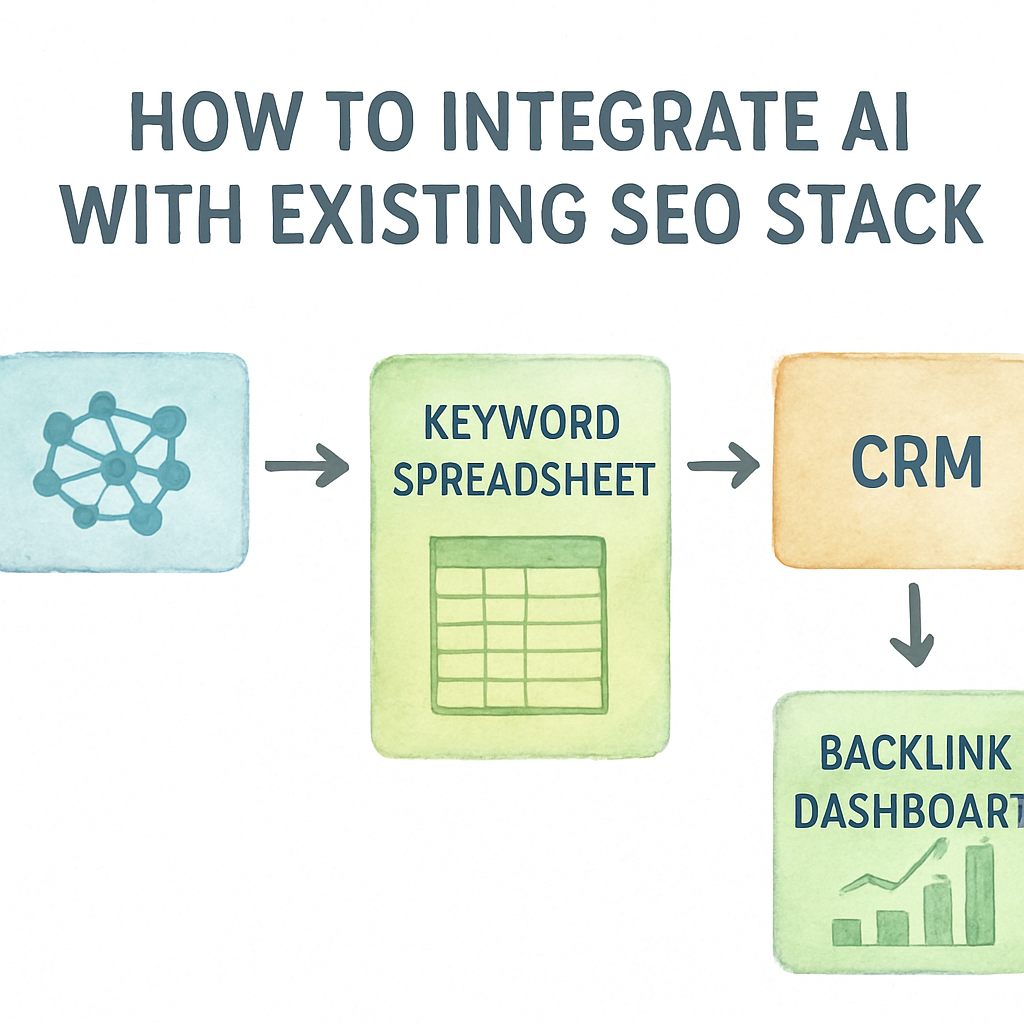
Bottom line: integration is just a series of small, repeatable hand‑offs. When each hand‑off is automated, the whole system runs itself, and you get to focus on the creative part—crafting the stories that earn those coveted backlinks.
Conclusion
We've walked through every piece of the puzzle, from feeding keywords to your AI engine, to stitching together outreach sequences, and finally looping backlink verification back into your dashboard.
So, what does that mean for you? It means you can finally stop juggling spreadsheets and manual emails, and let a reliable system handle the grunt work while you focus on the stories that truly resonate.
Remember the three habits that keep the machine humming: start small, test each hand‑off, and schedule a weekly human checkpoint. Those tiny rituals turn a complex workflow into a predictable growth engine.
Want to see the results stack up? Try automating just one element—like AI‑generated meta descriptions—for a week and watch your traffic lift before you know it.
And if you ever hit a snag, go back to the checklist we built together: data sources, integration platform, reusable prompt, triggers, test run, backlink check, human review. One pass through that list will get you back on track.
Ready to let the AI do the heavy lifting? Dive back into your spreadsheet, fire up that Zap, and watch the backlinks roll in. The future of link building is already here—grab it.
Start today, see growth tomorrow.
FAQ
What’s the first thing I should do when figuring out how to automate link building with AI?
Start by pulling together a clean, focused list of the keywords and competitor URLs you actually want to outrank. Export that list to a simple spreadsheet – think column for keyword, column for competitor URL, and a column for a quick relevance score you assign yourself. Once the data is tidy, you can feed it into any AI‑powered prospecting tool and let the model surface high‑authority sites that match your intent. This tiny data‑prep step saves you from chasing irrelevant prospects later.
Which AI tools work best for finding link prospects?
In our experience, tools that combine domain authority metrics with a contextual relevance engine give the best ROI. Look for platforms that let you upload a CSV, return a DR or DA score, and also highlight where the target keyword appears on the prospect’s page. A good AI prospecting tool will also let you add custom filters – for example, only show sites with traffic over 5K or a content freshness of less than three months. That way you’re not just getting a raw list, you’re getting a curated prospect pool ready for outreach.
How can I make AI‑generated outreach emails sound personal, not robotic?
The secret is to feed the model specific variables: prospect’s first name, a recent piece of content they published, and a concrete hook that ties your asset to theirs. For instance, tell the AI, “Reference their 2024 blog post about sustainable packaging and suggest our case study as a complementary resource.” Then ask it to keep the tone conversational, under three sentences, and to include a single, clear call‑to‑action. Review the draft, tweak any odd phrasing, and you’ll have a message that feels like a hand‑written note.
Can I set up automatic follow‑ups without coming across as spammy?
Yes, but you need a rule‑based trigger and a human checkpoint. Program the sequence to send the first email immediately, a gentle reminder after three days, and a final nudge after seven days – but only if the prospect hasn’t opened or replied. Use a “reply‑only” mailbox so any response pauses the workflow and hands the conversation over to a real person. Adding that small pause prevents the AI from bombarding inboxes and keeps your brand trustworthy.
How do I measure the success of an AI‑driven link‑building campaign?
Track four core metrics: open rate, click‑through rate (CTR), reply rate, and the eventual backlink acquisition rate. Set a baseline from your manual outreach (e.g., 12% reply) and aim for at least a 15% reply when AI is involved. Use a spreadsheet or a simple dashboard to plot weekly trends. If any metric drops below your threshold, pause the sequence, tweak the AI prompt, and run an A/B test before scaling again.
What common mistakes should I avoid when automating link building with AI?
Don’t let the AI run completely unchecked. Common pitfalls include using generic, outdated hooks, over‑automating the follow‑up cadence, and neglecting data freshness. Always refresh your prospect list at least weekly, and inject a human review after the second email – that’s where you catch awkward phrasing or stale references. Also, avoid feeding the AI too many variables at once; a clean, focused prompt yields clearer, more relevant copy.
How often should I refresh my prospect list and AI prompts?
We recommend a weekly refresh for the prospect list – search engine rankings shift, new content appears, and authority scores change. As for prompts, treat them like SEO copy: revisit them after every major campaign or whenever you notice a dip in reply rates. A quick tweak – adding a recent webinar title or swapping “click here” for a natural call‑to‑action – can lift performance by several points without overhauling the whole workflow.