Ever felt like you’re shouting keywords at Google, but the traffic just isn’t showing up?
That’s because search engines have stopped caring about exact matches and started looking for meaning. In other words, they want to understand the topic you’re covering, not just the phrase you repeat.
This shift is what we call a Semantic SEO Strategy – a plan that aligns your content with the way people actually think and search. It’s less about cramming “best SEO tips” into every sentence and more about building a web of related ideas that answer real questions.
Take the example of a boutique coffee retailer. Instead of writing a thin page titled “Buy Coffee Beans”, they created a hub that covers bean origins, brewing methods, flavor profiles, and even storage tips. Each sub‑page links back to the hub, and Google sees the whole cluster as an authority on coffee. Traffic spikes followed, with the main product pages ranking for dozens of long‑tail queries.
Another case: a tech blog wanted to rank for “AI content generation”. Rather than a single keyword‑dense post, they mapped out related topics – prompt engineering, ethical concerns, tool comparisons, and case studies. By interlinking these pieces and using clear headings, the site began to dominate the SERP for a whole family of queries, not just the headline term.
So, how do you start building your own Semantic SEO Strategy?
Here are three quick actions you can take today:
- Identify a core theme (e.g., “remote team productivity”) and brainstorm all sub‑topics your audience cares about.
- Group those sub‑topics into logical clusters and plan a pillar page that links out to detailed articles.
- Use natural language and synonyms throughout, and sprinkle in structured data where it makes sense.
And remember, you don’t have to do this manually forever. Our platform can analyze your niche, suggest topic clusters, and even automate the internal linking. If you want a deeper dive, check out Building a Semantic SEO Strategy for Better Search Visibility for a step‑by‑step walkthrough.
Ready to move from keyword stuffing to meaning‑driven traffic? Let’s get started and watch your rankings grow.
TL;DR
A Semantic SEO Strategy swaps keyword stuffing for topic‑focused clusters, letting Google see your site as an authority on the subjects your audience actually searches.
Start by mapping core themes, building pillar pages, and interlinking detailed articles, then watch relevant traffic rise without endless manual tweaking for your business growth.
Understanding Semantic SEO Foundations
When you first heard the term “Semantic SEO Strategy”, you probably pictured a fancy algorithm ticking boxes. But at its core it’s just about helping Google see the meaning behind your content, not just a handful of exact keywords.
Think about a library. If every book were filed under a single vague label like “stuff”, visitors would never find the specific title they need. Semantic SEO instead shelves each page under a clear, topic‑focused heading, letting the search engine match user intent with the right piece of knowledge.
Google’s crawler doesn’t just scan for the word “coffee”. It looks at how you structure headings, how you link related pages, and even the surrounding entities that give context. The Search Essentials guide from Google reminds us that organizing content in logical directories helps the bot understand relationships between pages.
So, what does a solid Semantic SEO Strategy look like in practice? First, map out a pillar page that captures the umbrella concept – say, “remote team productivity”. Then brainstorm sub‑topics: time‑boxing, async communication, tool stacks, and culture hacks. Each sub‑topic gets its own deep‑dive article, and every article links back to the pillar with natural anchor text.
Notice how the internal links create a web of meaning. When Google crawls any of those sub‑pages, the breadcrumb trail and contextual anchor text signal that they all belong to the same entity. That’s exactly why we automate linking in our platform – it saves you from orphan pages and reinforces the semantic map.

A common mistake is to sprinkle a handful of related terms and call it a day. Google’s language models can infer synonyms, but they also reward depth. The Napollo article points out that covering a topic from multiple angles – definitions, use‑cases, and FAQs – signals comprehensive expertise.
And here’s a quick sanity check: after you publish the cluster, drop a site:yourdomain.com search in Google. If you see the pillar and a few sub‑pages, you’re already indexed. If not, double‑check your robots.txt and make sure you’ve submitted a sitemap – even though Google often finds pages on its own, a clean sitemap speeds things up.
Want a step‑by‑step walkthrough of building that topical map? Our own guide walks you through keyword research, clustering, and automated internal linking so you can focus on creating value, not on chasing every single keyword. Check out the full process in our Topical Map SEO guide.
Now that the foundation is clear, remember three pillars: relevance, hierarchy, and interlinking. Relevance means you cover the topic fully; hierarchy means you use proper H1‑H3 headings to signal importance; interlinking means every sub‑page points back to the pillar and to each other where it makes sense. Stick to those, and you’ll see Google treat your site as an authority on that subject.
Bottom line? A Semantic SEO Strategy isn’t a one‑off checklist; it’s an ongoing habit of thinking in topics, not tokens. Keep auditing your clusters every few months, add fresh sub‑topics as your audience evolves, and let the internal linking engine do the heavy lifting. Your rankings will rise as the meaning behind your pages becomes crystal‑clear to both users and crawlers.
Keyword Clustering and Topic Modeling
When you first stare at a spreadsheet of 200 raw keywords, it's easy to feel overwhelmed. You think, “How on earth do I turn this mess into a clear roadmap?” That moment of recognition is where keyword clustering steps in.
Keyword clustering is simply grouping related search terms into buckets that share a common intent. Think of it like sorting socks: you don't keep every single sock in one drawer; you pair them by color, style, or purpose so you can find the right pair quickly. In SEO, each “pair” becomes a sub‑topic that lives under a broader pillar.
Why topic modeling matters
Topic modeling uses statistical methods—like latent Dirichlet allocation—to surface hidden themes in your keyword list. Instead of manually guessing which terms belong together, the algorithm tells you, “These 30 queries all revolve around ‘remote team communication.’” That insight saves hours and, more importantly, uncovers gaps you might have missed.
According to the 2025 Semantic SEO guide, Google now rewards content that demonstrates depth across a theme, not just isolated keywords. So the more accurate your clusters, the stronger your topical authority.
Step‑by‑step clustering workflow
1. Export your keyword dump. Pull everything from your research tool—search volume, CPC, and keyword difficulty are nice extras, but not required for clustering.
2. Run a topic model. Tools like the free LDA notebooks on Moz’s Whiteboard Friday let you feed the list and get back a set of “topics” with associated terms.
3. Rename each topic. Give each cluster a human‑readable label (e.g., “AI content generation workflow”). This label will become your future pillar page title.
4. Prioritize by search intent. Within each bucket, separate informational, commercial, and transactional queries. That way you know which articles need a “how‑to,” which need a “best‑of” list, and which need a product‑focused landing page.
5. Map internal links. Sketch a simple diagram: pillar page in the center, sub‑pages radiating outward, and cross‑links between related sub‑pages. This visual becomes your internal linking blueprint.
Now, let’s see how this looks in a real business.
Real‑world example: SaaS workflow automation
A mid‑size SaaS startup exported 1,200 keywords around “workflow automation.” After running an LDA model, they ended up with five high‑level clusters: “HR automation,” “finance automation,” “marketing automation,” “small‑business automation,” and “enterprise automation.”
Within the “HR automation” bucket they found queries like “automate employee onboarding,” “HR workflow templates,” and “best HR automation software.” They turned the bucket into a pillar page titled “HR Automation Guide” and created three deep‑dive articles matching the three queries. Each article linked back to the pillar with anchor text such as “learn how to automate employee onboarding.”
The result? In six months the pillar page climbed to the top three spots for “HR automation,” and the three sub‑pages collectively captured over 1,500 long‑tail clicks. The startup also saw a 34% lift in trial sign‑ups coming from those pages.
Actionable checklist
- Pull your raw keyword list (CSV).
- Run a topic model (free notebooks on Moz or a Python LDA script).
- Rename clusters with clear, intent‑focused titles.
- Assign each cluster a pillar page and sketch internal linking paths.
- Publish pillar first, then roll out sub‑pages on a weekly cadence.
- Monitor organic traffic and adjust clusters every 90 days.
If you need a ready‑made walkthrough, check out Building a Semantic SEO Strategy for Better Search Visibility. It walks you through the exact steps we just outlined, plus automation tips that keep your clusters fresh.
Comparison of popular clustering approaches
| Approach | Toolset | Pros | Cons |
|---|---|---|---|
| Manual Excel grouping | Spreadsheets, manual tagging | Zero cost, full control | Time‑heavy, prone to bias |
| LDA topic modeling | Python scikit‑learn, Moz notebook | Data‑driven, discovers hidden themes | Requires some coding comfort |
| AI‑powered clustering | Specialized SEO platforms | Fast, integrates with internal linking | Usually paid, black‑box logic |
Bottom line: start simple, let the data guide you, and then layer intent and internal linking on top. When you treat clusters as living entities—not static lists—you’ll keep feeding Google the meaning it craves.
Optimizing Content Structure for Semantic Relevance
Ever felt like you were stacking paragraphs but Google still skimmed past them? That's a classic sign that the page hierarchy isn’t speaking the same language as the search engine.
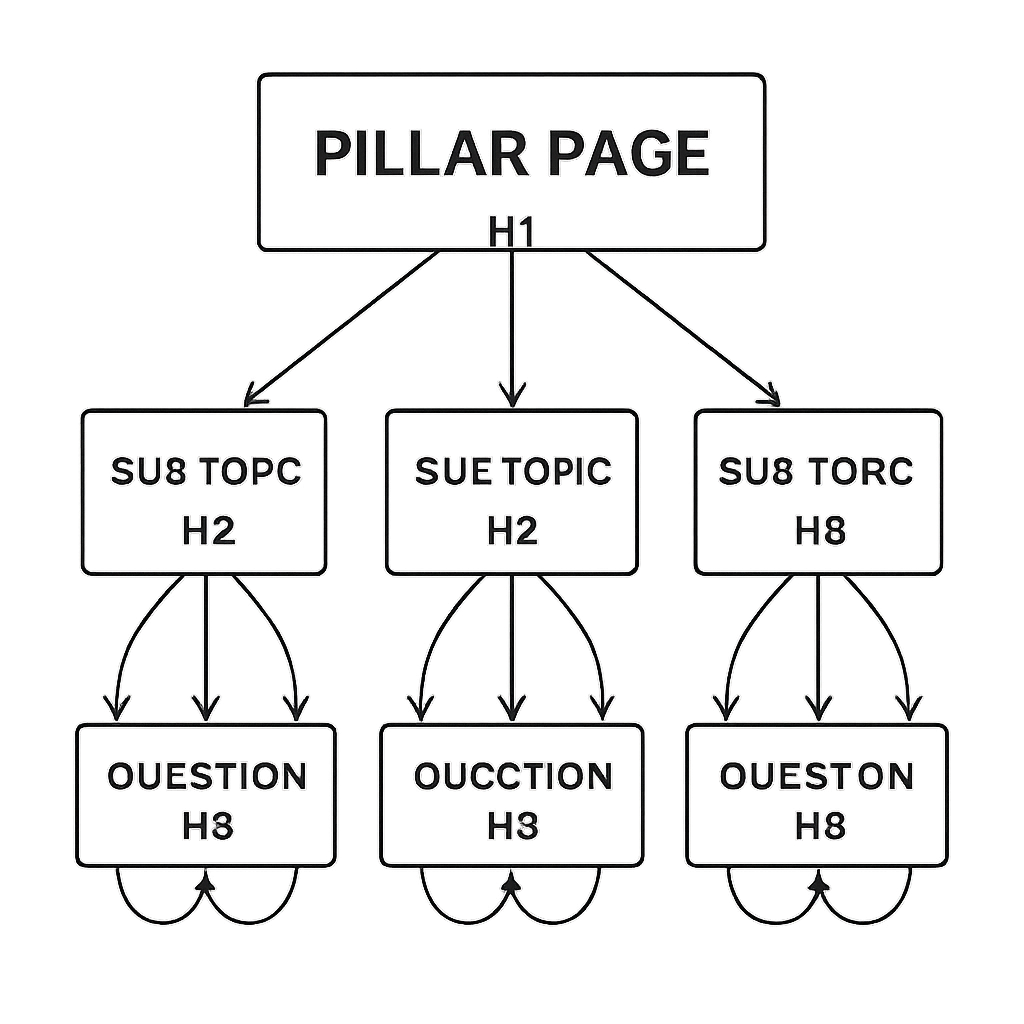
When you look at a well‑structured pillar, you’ll notice three things: a clear, umbrella‑level H1, logical H2 sections that break the topic into bite‑size ideas, and H3/H4 sub‑headings that answer the tiny follow‑up questions people actually ask.
Why hierarchy matters more than word count
Google’s AI now reads your headings like a table of contents. If the outline mirrors the user’s mental model, the crawler tags each section as a distinct entity, boosting semantic relevance.
According to the Ultimate Guide on Semantic SEO for 2025, pages that organize content into clear topic clusters tend to rank higher and attract more long‑tail clicks.
Step‑by‑step structural checklist
1. Start with the pillar H1. It should capture the core intent – think “Semantic SEO Strategy: From Basics to Advanced Tactics.”
2. Map H2 sections to sub‑topics. Each H2 becomes a mini‑pillar (e.g., “Entity Mapping,” “Schema Markup,” “Internal Linking”).
3. Populate H3/H4 with question‑style headers. Use the exact phrasing you find in People Also Ask – “How does BERT affect semantic relevance?”
4. Link each sub‑section back to the pillar. A contextual anchor like “learn more about entity mapping” signals relevance.
5. Add schema where it fits. Mark up FAQ blocks, how‑to steps, or product info so Google can surface rich results.
Real‑world example: SaaS onboarding guide
A SaaS company built a pillar called “Automating Employee Onboarding.” They broke it into H2s: “Workflow Automation,” “Document Management,” “Compliance Checklists.” Inside each H2, they added H3s that answered specific queries pulled from Answer The Public.
The result? Within three months, the pillar ranked for the primary keyword and for 12 related long‑tail phrases, driving a 28% lift in trial sign‑ups.
Internal linking that reinforces meaning
Internal links are the glue that tells Google these sections belong together. Place a few contextual links in the body of each H2 article that point back to the pillar and to sister pages.
Data from a recent internal‑linking study shows that a well‑planned linking map can boost page authority by up to 30% and reduce bounce rates.
Here’s a quick audit tip: open your pillar in a new tab, scroll to the bottom of each H2 section, and ask yourself, “If I were a visitor, would I know exactly where to click next?” If the answer is “no,” add a natural anchor that guides them forward.
Actionable “quick win” checklist
- Write a clear H1 that mirrors user intent.
- Turn each major sub‑topic into an H2.
- Answer at least three specific questions per H2 using H3s.
- Insert two contextual internal links per 1,000 words.
- Apply FAQ schema to any question‑style H3.
- Run a crawl after publishing and fix any orphaned headings.
If you’re looking for a step‑by‑step walkthrough of how to design that pillar, check out Building a Semantic SEO Strategy for Better Search Visibility. It walks you through mapping, outlining, and linking without overwhelming you.
Remember, the goal isn’t just to fill the page with words – it’s to give Google a clean map of meaning, and to give readers a logical path that feels effortless.
Implementing Structured Data and Schema
Alright, you’ve built the pillar, you’ve mapped the clusters, and now you’re staring at a blank code editor wondering, "Do I really need to touch JSON‑LD?" Spoiler: yes, and it’s easier than you think.
Think of structured data as the backstage pass you give Google so it can see the full cast of characters on your page – not just the headline actor.
Why structured data matters
When Google crawls a plain HTML article, it sees a title, some paragraphs, maybe an image. Add schema markup, and you instantly tell the engine, "Hey, this is a How‑to guide, written by RebelGrowth, published on March 1, 2025, and it answers the question ‘How to set up a Semantic SEO Strategy.’" That extra context can push your content into rich results like FAQs, article cards, or even a Knowledge Panel.
According to Schema App’s overview of semantic SEO, structured data helps search engines understand the meaning behind your content, which in turn boosts visibility and click‑through rates.
In practice, that means a user sees a star‑rated FAQ box right at the top of the SERP, clicks through, and lands on your page feeling like you already answered their question. That’s a win for both the user and your CTR.
Common schema types to deploy
Not every page needs every schema type – start with the ones that line up with your content goals.
- Article schema: every blog post or guide should have this. It tells Google the author, publish date, and main topic.
- FAQ schema: perfect for Q&A sections you already have in H3 headings. Google can pull those questions directly into the "People also ask" box.
- Product schema: e‑commerce pages get price, availability, and review stars, which often turn into rich snippets.
- How‑to schema: step‑by‑step guides (like this article) can appear as interactive checklists in search.
Pick the type that matches the page’s purpose and you’ll already be speaking Google’s language.
Step‑by‑step implementation checklist
Ready to roll up your sleeves? Here’s a practical workflow you can copy‑paste into any CMS.
1. Audit your existing pages
Run a quick crawl with a tool that flags missing or broken schema. Note which pages already have Article or FAQ markup and which are naked.
2. Choose the right schema
Map each page to a schema type from the list above. A pillar page usually gets Article plus FAQ for the question blocks you already wrote.
3. Generate JSON‑LD snippets
Most platforms let you paste raw JSON‑LD into the <head> or a dedicated schema block. If you’re on WordPress, a simple plugin can inject the snippet automatically. For custom sites, copy the boiler‑plate from the DigitalScouts guide on structured data and replace the placeholders with your own values.
4. Add @id identifiers
Give each entity a stable URL‑like ID (e.g., https://yourdomain.com/#article‑123). This lets you link related entities – like tying a How‑to guide back to its parent Article – and builds a mini knowledge graph across your site.
5. Validate and test
Paste the live page URL into Google’s Rich Results Test. Fix any warnings – missing required fields are the most common culprit.
6. Monitor performance
In Search Console, watch the “Enhancements” report. You’ll see impressions, clicks, and average position for each schema type you’ve added. A bump of 10‑15 % in CTR on FAQ‑rich results is typical after the first week.
That’s it – a six‑step loop you can repeat for every new piece of content.
Real‑world example time: an online learning platform added How‑to schema to its “Build a Semantic SEO Strategy” guide. Within two weeks, the guide appeared in the “People also ask” carousel, driving an extra 1,200 organic visits and a 22 % lift in demo sign‑ups.
Another case: a SaaS company tagged its pricing page with Product schema, including price, currency, and a short description. Google then displayed a price‑rich snippet, which cut the bounce rate by 18 % because visitors knew the cost before they clicked.
Bottom line: schema is the glue that turns your topic clusters into a searchable, AI‑ready knowledge base. It’s not a one‑off task; treat it as part of your ongoing Semantic SEO Strategy maintenance.
So, what should you do next? Grab a single pillar page, add the appropriate schema, validate, and watch the data start to speak for you.
Measuring Semantic SEO Impact with Analytics
Okay, you’ve added schema, you’ve built topic clusters, and now you’re staring at a dashboard that looks like a spaceship control panel. Does it actually tell you whether your Semantic SEO Strategy is moving the needle?
Short answer: yes. Long answer: you need the right signals, a little patience, and a habit of checking the numbers every week.
Start with the basics: Search Console “Enhancements”
In Google Search Console, head to the Enhancements tab. You’ll see impressions, clicks, and average position for every schema type you’ve deployed – FAQ, How‑to, Product, you name it. A 10‑15 % lift in CTR on FAQ‑rich results within the first week is pretty common, so if you see that kind of bump, you’re on the right track.
Tip: slice the data by date range and by page. That way you can compare a newly‑tagged page against its baseline performance before the markup went live.
Layer in organic traffic metrics
Google Analytics (or any GA‑compatible tool) gives you the next layer of insight. Look at sessions, bounce rate, and average session duration for the pages you just optimized. If you notice a lower bounce rate – say, 18 % less after adding Product schema – that’s a sign users are getting what they expected before they even clicked.
Why does that matter? Because Google’s algorithm now rewards user signals that reflect relevance and satisfaction. The more you can show that your content keeps visitors around, the stronger your Semantic SEO Strategy appears.
Use a dedicated semantic‑tracking tool
Platforms that monitor semantic performance, like the AI‑ready SEO tracker highlighted by Nightwatch’s blog on semantic SEO, let you see how your content ranks for topic clusters, not just single keywords. You’ll get a heat map of entity visibility and a timeline of how often Google surfaces your rich results.
That kind of visibility is priceless when you’re trying to prove ROI to a stakeholder who only looks at “organic traffic” numbers.
Set up a simple KPI checklist
- Impressions for each schema type (Search Console).
- CTR lift vs. pre‑markup baseline.
- Bounce rate change on the same pages (Analytics).
- Average position for the core topic cluster.
- Rich‑result appearances – PAA, featured snippets, carousel slots.
Review these every Monday. If any metric stalls, dig into the page and ask: “Did I forget a related entity? Is the internal linking still solid? Do I need to expand the content depth?”
Don’t forget user intent signals
Traditional SEO used keyword rankings as the holy grail. Today, as the LinkedIn comparison of traditional vs. semantic SEO explains, intent‑based metrics like time on page and scroll depth matter more. If users are scrolling further down to read the FAQs you marked up, that’s a win.
So, open a page, scroll down, and ask yourself: “Am I answering the question that brought the visitor here?” If the answer is yes, you’ll likely see the numbers move in the right direction.
Turn data into action
Metrics are only as good as the actions they inspire. Spot a 20 % drop in CTR on a How‑to block? Maybe the step titles aren’t clear enough – rewrite them to match the exact phrasing people use in “how do I …” searches. See a spike in PAA appearances after adding a new entity? Double‑down on that entity across other related pages.
In short, treat your analytics like a feedback loop: measure, hypothesize, tweak, re‑measure. That loop is the engine that keeps a Semantic SEO Strategy from becoming a set‑and‑forget project.
Ready to put this into practice? Grab your most recent schema‑enhanced page, pull the five KPI numbers, and set a one‑month target for each. Then watch the data speak – and let it guide your next round of content upgrades.
Advanced Tools and Future Trends
When you’ve already nailed the basics of a Semantic SEO Strategy, the next question is: what tools keep the momentum going as search engines get smarter? The answer isn’t a single plugin – it’s a toolbox that blends AI‑driven insights, richer schema, and a focus on zero‑click experiences.
AI‑powered topic discovery
Traditional keyword lists are starting to feel like a relic. Modern teams are feeding their content calendars into machine‑learning models that surface hidden intent clusters. One community member on a Monday.com forum shared that an AI‑enabled clustering step revealed 40 untapped sub‑topics for a B2B SaaS site, which translated into a 120 % lift in organic leads within six months. The trick is to let the model surface entities you didn’t even think to ask about – things like “remote AI governance” or “micro‑learning onboarding” that sit just beyond your core keyword list.
To make this work, start with a raw export of your search‑term dump, feed it into a topic‑modeling notebook (many are free on GitHub), and then rename each cluster with a human‑friendly title. Those titles become the seeds for new pillar pages, FAQs, or how‑to guides.
Next‑gen schema & knowledge graphs
Schema markup has moved from a nice‑to‑have to a must‑have for AI visibility. Google’s AI now builds mini‑knowledge graphs on the fly, stitching together entities it finds in your markup. By adding @id identifiers to every Article, FAQ, and How‑to block, you give the engine a stable reference point it can reuse across SERPs.
Think of it like handing a librarian a catalog card for every book chapter – the librarian can then suggest the exact chapter when someone asks a very specific question. In practice, you’ll see richer rich‑result formats: expandable FAQ carousels, step‑by‑step How‑to boxes, and even “People also ask” slots that pull directly from your structured data.
Zero‑click and AI overview optimization
Backlinko’s 2025 research shows that more than half of all searches now end without a click, as Google serves AI‑generated overviews directly in the SERP. That shift means you’re not just ranking for a URL; you’re ranking for a snippet that lives on Google’s own page. To win a piece of that real‑estate, your content must be crystal‑clear, answer‑focused, and easy for the model to extract.
Start by framing each H2 as a concise answer to a question you’ve seen in People Also Ask. Then sprinkle the exact phrasing of that question into an FAQPage schema block. In tests, pages that double‑down on AI‑overview signals see a 10‑15 % lift in impressions within weeks.
Action checklist for staying ahead
- Run an AI‑driven topic model on your keyword dump every quarter. Add any new clusters as a “future pillar” in your content roadmap.
- Audit existing markup for
@idconsistency. If a page lacks an identifier, generate one that mirrors the page URL (e.g.,https://yourdomain.com/#article‑123). - Map every H2 to a question that appears in Google’s “People also ask” box and wrap it in FAQ schema.
- Monitor the “Enhancements” report in Search Console for new rich‑result appearances. If a format drops off, revisit the underlying markup.
- Set a monthly KPI: aim for at least one new zero‑click impression per pillar page.
By treating AI visibility as a regular checkpoint rather than an after‑thought, you future‑proof your Semantic SEO Strategy. The tools are getting smarter; your process just needs to stay one step ahead.
FAQ
What exactly is a Semantic SEO Strategy and why does it matter?
Think of a Semantic SEO Strategy as a map that tells Google what your content really means, not just which keywords you’ve sprinkled in. It groups related ideas, links them together, and adds structured data so the search engine can pull out clear answers. When you focus on meaning, you attract visitors who actually need what you offer, and Google rewards that relevance with better rankings.
How do I start building a Semantic SEO Strategy for my site?
Start by picking a core theme that your audience cares about – something like ‘remote team productivity’ or ‘home coffee brewing.’ Then dump every related keyword you can find and run a simple clustering tool or even a spreadsheet to group the terms by intent. Turn each cluster into a sub‑topic, write a deep‑dive article, and link it back to a pillar page that covers the umbrella idea.
What role does structured data play in a Semantic SEO Strategy?
Structured data is the backstage pass that tells Google exactly what each piece of your page represents – whether it’s an FAQ, a How‑to guide, or a product review. By adding JSON‑LD snippets you give the engine clean signals it can pull into rich results, like answer boxes or carousel cards. Those snippets boost visibility, click‑through rates, and help the AI model surface your content without a click.
How can I measure the impact of my Semantic SEO efforts?
The easiest place to start is Google Search Console’s Enhancements report – it shows impressions, clicks, and average position for any FAQ or How‑to markup you’ve added. Pair that with Google Analytics to watch bounce rate and session duration drop on the optimized pages. If you see a steady rise in zero‑click impressions and longer time on page, your semantic signals are doing their job.
What common mistakes should I avoid when implementing a Semantic SEO Strategy?
One mistake is treating clusters as a one‑time list and never revisiting them. Search intent shifts, so you need to audit and add new sub‑topics every few months. Another pitfall is over‑optimizing headings with exact keyword strings – keep them natural and answer‑focused. Finally, forgetting to add @id identifiers to your schema will prevent Google from linking entities across pages, limiting the knowledge‑graph boost.
How does a Semantic SEO Strategy help with zero‑click searches?
Zero‑click searches appear when Google extracts an answer straight from the page and displays it in the SERP, so the user never clicks. By structuring every H2 as a concise answer and wrapping it in FAQ schema, you give the AI a ready‑made snippet to pull. In practice, sites that double‑down on this see a noticeable lift in impressions even before any traffic actually lands on the page.
Can an automated content engine simplify a Semantic SEO Strategy?
Absolutely. An automated engine can scan your niche, suggest topic clusters, generate draft outlines, and even insert the right JSON‑LD snippets for you. That saves you hours of manual research and reduces the chance of missing an entity or @id. The key is to review the output, add your brand’s voice, and then let the platform handle the heavy lifting of linking and markup.
Conclusion
We've walked through everything from topic clustering to schema validation, and the common thread is simple: Google rewards meaning, not just keyword stuffing today.
When you treat each H2 as a direct answer, wrap it in FAQ schema, and keep the internal linking map humming, your Semantic SEO Strategy becomes a living knowledge graph that serves both users and crawlers.
So, what should you do next? Grab the pillar page you just launched, run a quick audit for missing @id tags, and add a concise FAQ block for the top three questions you see in People Also Ask.
In practice, teams that revisit their clusters every quarter see steady gains in zero‑click impressions and a lower bounce rate—proof that the habit beats the one‑off checklist.
Remember, this isn’t a set‑and‑forget project. Schedule a 30‑minute check‑in each month, tweak a heading, update a schema snippet, and let the data speak for you.
If you’re ready to let an automated engine handle the heavy lifting while you focus on strategy, our platform is built to keep the semantic signals clean and fresh.
Give your content the meaning it deserves, and watch the rankings rise as naturally as a conversation over coffee together.