
Learning how to do an SEO audit is all about giving your website a systematic health check. You'll dig into everything: technical performance, on-page elements, content quality, and your backlink profile. Think of it as a structured process to find—and fix—all the pesky issues that are holding your site back from ranking higher and pulling in more organic traffic.
Why an SEO Audit Is Your Best Growth Playbook

Don't just think of an SEO audit as another task on your to-do list. It's your strategic roadmap for digital growth. It’s the business intelligence that shines a light on hidden opportunities, critical threats, and where you really stand against the competition.
Before you dive headfirst into an audit, you need to get the fundamentals down. For a solid foundation, check out this guide on What Is Search Engine Optimization?. Knowing the "why" behind the "what" makes every step of the audit that much more meaningful.
Instead of just guessing what might work, an audit gives you a clear, data-backed plan. You'll end up with a concrete list of actions designed to directly improve your search visibility and maximize the impact of every marketing move you make.
Uncovering Quick Wins and Long-Term Strategy
One of the best parts of an audit is spotting the "quick wins." These are usually simple fixes that can give you an almost immediate traffic lift. We're talking about things as basic as fixing broken internal links or optimizing a few high-potential title tags. These small adjustments build momentum while you tackle the bigger, more complex issues.
At the same time, a proper audit is what builds your long-term strategy. It helps you get a real handle on:
- Technical Health: Is your site a breeze for Google to crawl and index? Or are technical roadblocks like slow page speed or wonky redirects tanking your performance?
- Content Gaps: Where are your competitors eating your lunch? An audit uncovers the keywords and topics you’re completely missing, giving you a clear roadmap for content creation.
- Backlink Quality: Are your backlinks helping or hurting you? A backlink analysis will sniff out toxic links that could lead to penalties and, just as importantly, show you the high-value links you need to replicate.
An SEO audit is your website's regular health checkup. It diagnoses problems you didn't know you had, prevents future penalties, and ensures you're investing your marketing budget where it counts the most.
Staying Competitive in a Growing Market
The digital marketplace is only getting more crowded. The global SEO market was valued at $82.3 billion in 2023 and is projected to shoot up to $143.9 billion by 2030. That’s a ton of growth, and it highlights just how intense the competition for online visibility is.
When you consider that a staggering 94% of webpages get no organic traffic from Google, an audit becomes your key to breaking through the noise and claiming your share. Systematically improving your website positions you to compete effectively and shields your site from getting hammered by costly algorithm updates. It’s the most reliable way to build a digital foundation strong enough to support sustained growth.
Setting Up Your Audit Command Center
A powerful audit doesn’t just happen. It’s not about randomly poking around a website looking for problems. A truly effective audit starts with a well-organized setup. Before you even think about on-page factors or technical SEO, you need to get your tools in order and establish a clear performance baseline.
Think of this initial groundwork as building your command center. It’s what turns a simple checklist of tasks into a strategic plan for growth.
First things first, you need to connect to your primary sources of truth: Google Search Console and Google Analytics. These are non-negotiable. They’re free, and they give you direct insight from Google on how it sees your site and how real users are interacting with it.
Inside Google Search Console, head straight for the Performance report. This is where you’ll see your current clicks, impressions, and keyword rankings. Next, check the Pages report (under the Indexing section) to spot any glaring indexing issues that are stopping your pages from showing up in search at all.
Choosing Your Core Audit Tool
While Google’s tools are essential, you need a dedicated SEO tool to perform a deep crawl of your website. This is how you’ll uncover the technical skeletons hiding in your closet. There are a few fantastic options, each with its own strengths.
- Ahrefs or Semrush: These are the all-in-one powerhouses. They're perfect for technical crawls, backlink analysis, and competitor research. They also give you a handy "Health Score" that helps you quickly prioritize what to fix.
- Screaming Frog SEO Spider: This is a desktop-based crawler that gives you an incredible amount of detailed technical data. For many seasoned SEO pros, it’s the go-to tool for its raw power and granular control.
No matter which tool you pick, the first step is the same: kick off a full site crawl. Your tool will act like a search engine bot, visiting every linkable page on your site to build a complete map of its structure and health.
The infographic below gives you a solid visual of how a technical site crawl works—from scanning URLs to pinpointing critical errors and building an actionable report.
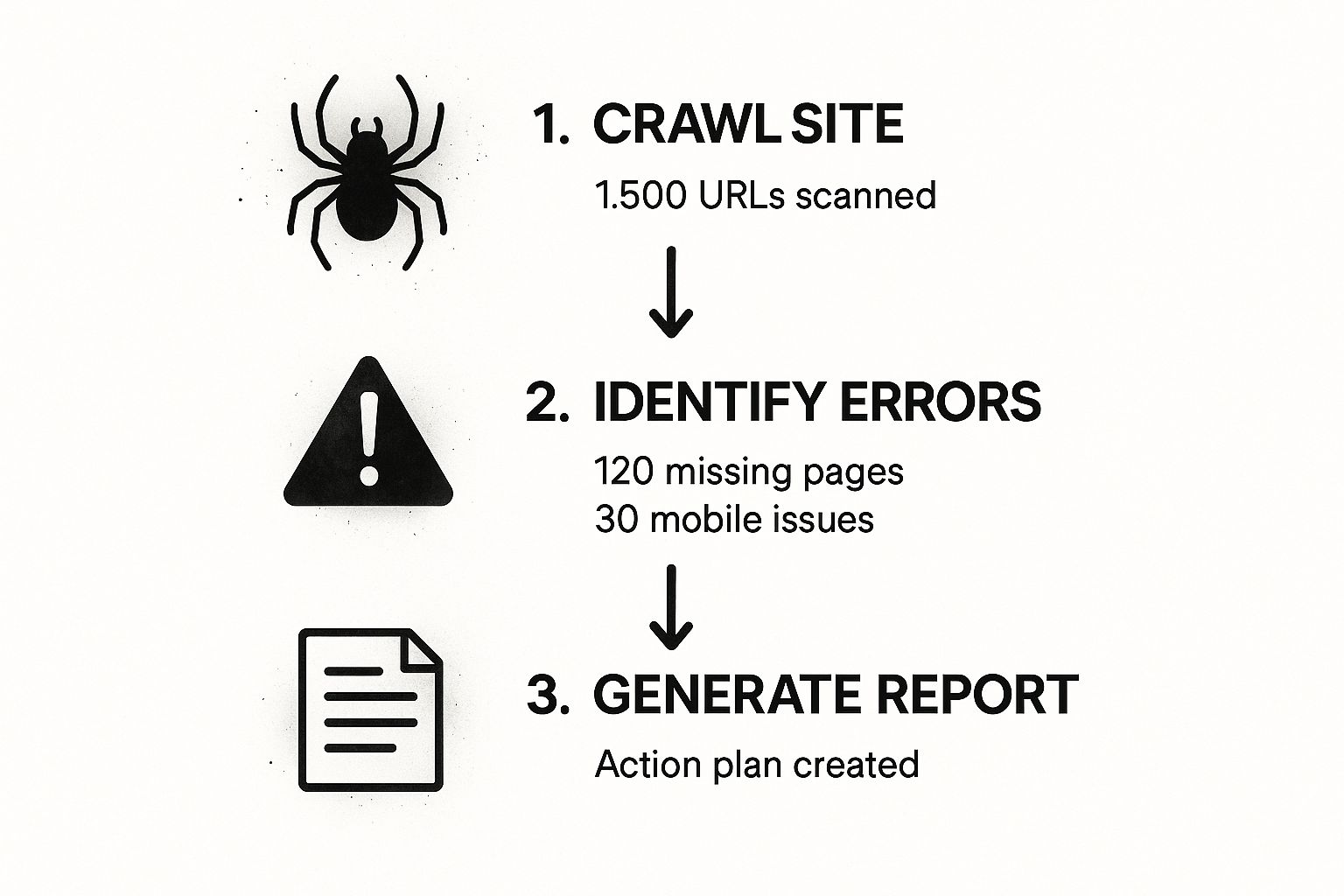
As you can see, the process systematically turns thousands of individual URLs into a prioritized list of issues, which becomes the foundation of your technical to-do list.
To help you decide which tool fits your needs, here's a quick breakdown of the essentials.
Essential SEO Audit Tool Comparison
| Tool | Primary Function | Key Audit Use Cases | Cost |
|---|---|---|---|
| Google Search Console | Performance & Indexing | Checking organic traffic trends, keyword rankings, index status, and core web vitals. | Free |
| Google Analytics | User Behavior Tracking | Measuring organic traffic volume, user engagement, and conversion rates from search. | Free |
| Ahrefs / Semrush | All-in-One SEO Platform | Comprehensive site crawls, backlink profile analysis, keyword gap analysis, competitive research. | Paid (Subscription) |
| Screaming Frog | Technical SEO Crawler | In-depth technical site crawls, finding broken links, analyzing page titles & meta data, generating sitemaps. | Freemium (Paid for full features) |
These four tools form the bedrock of any serious SEO audit, giving you a complete picture from both Google's perspective and a technical crawler's.
Establishing Your Performance Baseline
Running an audit without knowing your starting point is like trying to navigate without a map. Before you make a single change, you have to document your current performance. This baseline is the only way you’ll be able to accurately measure the impact of your fixes down the line.
Your baseline isn't just a set of numbers; it's the benchmark against which you'll prove the value of your SEO efforts. Documenting it is the most critical part of the setup process.
Grab a simple spreadsheet and record these key metrics:
- Organic Traffic: Use Google Analytics to find your average monthly organic traffic over the last three to six months.
- Top Keyword Rankings: Pull your top 10-20 non-branded keywords and their current positions from Google Search Console or your SEO tool.
- Conversion Rate from Organic Traffic: What percentage of your organic visitors are completing a key action, like filling out a form or buying a product?
- Crawl Errors: Note the total count of critical errors (like 404s or redirect chains) that your initial site crawl uncovered.
With this data saved, you have a clear "before" snapshot. Now, every fix you implement can be directly tied back to these core metrics, allowing you to demonstrate tangible progress. If you're looking for a structured way to manage this, our free AI SEO checklist provides a framework to ensure you cover every essential step.
Now that your command center is set up, you’re ready to move from preparation to analysis.
Conducting a Technical SEO Health Check
Technical SEO is the absolute bedrock of your entire strategy. Get this wrong, and even the most brilliant, engaging content will never see the light of day. If search engine bots can't efficiently crawl, render, and index your site, you're basically invisible.
Think of it like building a house. You wouldn't put up walls and a roof on a crumbling foundation, right? This health check is all about making sure that foundation is solid. We're moving beyond keywords to focus on the structural integrity of your site, ensuring the signals you send to search engines are clear and error-free.
Crawlability and Indexability First
Before anything else, you have to make sure search engines can actually find and understand your pages. This all starts with two little files that act as the instruction manual for crawlers: your XML sitemap and your robots.txt file.
Your XML sitemap is essentially a map of your most important URLs, telling search engines which pages you want them to crawl and index. A classic mistake I see all the time is cluttering sitemaps with pages that shouldn't be indexed, like thank-you pages or internal search results. Your audit needs to confirm this file is clean, current, and properly submitted in Google Search Console.
Next up is the robots.txt file. This simple text file tells search engine bots which parts of your site they shouldn't go into. It's powerful, but also dangerous. One tiny, misplaced "Disallow" directive can accidentally block your entire site from being crawled. You can dig deeper into how this file works right here: https://rebelgrowth.com/robots.txt.
Pro Tip: Jump into Google Search Console and check the "Coverage" report. This is where Google tells you exactly where its crawlers are hitting dead ends. Look for 404 "Not Found" errors, server errors (5xx), and funky redirect chains. Fix these first.
Auditing Site Speed and Core Web Vitals
Page speed is no longer just a minor ranking factor; it's a huge deal for user experience. Slow-loading pages kill conversions and send visitors bouncing away in frustration. Google has made it crystal clear that Core Web Vitals are a direct signal used for ranking.
These vitals zero in on three specific parts of the user experience: * Largest Contentful Paint (LCP): How long does it take for the main content to load? * Interaction to Next Paint (INP): How quickly does the page respond when someone clicks or taps? * Cumulative Layout Shift (CLS): How much does the layout jump around unexpectedly while loading?
Google's own PageSpeed Insights tool is perfect for this. It's free and gives you a performance score with actionable advice for both mobile and desktop. Your goal is to get into the green "Good" range by tackling things like massive images, render-blocking JavaScript, and slow server response times.
Ensuring Site Security and Mobile Friendliness
Security isn't optional anymore; it's the standard. With 87.7% of websites using HTTPS, it's an expectation for both users and search engines. If your site isn't secure, you're not just behind the curve, you're creating a trust issue from the get-go.
Your audit must confirm that your site uses HTTPS on every single page. Critically, you also need to check that any old HTTP versions automatically redirect to their secure HTTPS counterparts. This prevents duplicate content headaches and, more importantly, protects your visitors' data.
Just as critical is mobile-friendliness. Google now uses mobile-first indexing, meaning it primarily looks at the mobile version of your site for ranking and indexing. There's no way around it. Use Google’s Mobile-Friendly Test tool to make sure your pages look and work great on a smartphone.
Addressing Duplicate Content and Site Architecture
Duplicate content is a silent killer. It happens when the same—or very similar—content exists on multiple URLs, confusing search engines and diluting your ranking power. This is usually caused by technical quirks, not intentional copying.
Common culprits include:
* URL parameters for tracking clicks (like ?source=newsletter)
* Printer-friendly versions of pages
* WWW vs. non-WWW and HTTP vs. HTTPS versions of your site
The fix is the canonical tag (rel="canonical"). This tiny snippet of HTML tells search engines which URL is the "master" copy you want indexed. A proper audit involves crawling your site to sniff out these duplicate clusters and then making sure the correct canonical tags are in place.
Digging even deeper, your site's underlying technology can be the source of—or solution to—many of these issues. It's well worth your time understanding your tech stack's impact on SEO.
Finally, it all ties back to your site architecture. A logical, shallow structure (where important pages are just a few clicks from the homepage) is a win for both users and search engines. A good audit maps out your internal linking to ensure link equity flows to your most important pages and that no high-value pages are left "orphaned" without any internal links pointing their way.
Auditing Your On-Page and Content Strategy
Once your technical foundation is solid, it's time to look at what your visitors actually see: your on-page elements and your content. We're moving out of the engine room and onto the shop floor. This is where we figure out if your pages are actually built to attract, engage, and convert.
This goes way beyond just sprinkling a few keywords onto a page. It’s about making sure every single piece of content has a clear job, is structured in a way that makes sense, and is compelling enough to actually earn that click from the search results.
Analyzing Your On-Page SEO Essentials
First up, let's tackle the foundational on-page elements that Google uses to figure out what your content is about. Getting these right is often the quickest way to see some positive movement in your rankings.
Your title tags and meta descriptions are your digital billboards in the search results. A great title and description can seriously boost your click-through rate (CTR), even if your rankings don't budge. Your audit should be hunting for pages with:
- Missing or duplicate titles: Every page you want indexed needs its own unique, descriptive title. No exceptions.
- Truncated titles: Keep them under 60 characters. Anything longer will likely get chopped off in the SERPs.
- Uninspired meta descriptions: While not a direct ranking signal, a good meta description is your sales pitch. It's what convinces someone to click on your result instead of the one above or below it.
It's a crucial battleground. In fact, Google rewrites about 76% of titles shown in search results, so your original title has to be spot-on just to have a shot at being used or influencing the one Google creates.
Your title tag is the single most important on-page SEO element you have. It tells everyone—users and search engines—exactly what your page is about. Don't sleep on it.
Next, you'll want to check your heading structure (H1s, H2s, H3s). Think of the H1 as the main headline for the page; you should only ever have one. The H2s and H3s are your subheadings, breaking the content into digestible chunks that help readers (and crawlers) follow your train of thought.
Running a Content Gap Analysis
With your existing pages tightened up, the next question is: what are you missing? That's where a content gap analysis comes in. It's simply the process of finding valuable keywords and topics your competitors are ranking for, but you aren't. This is where the real growth opportunities are hiding.
Fire up a tool like Ahrefs or Semrush, pop in your domain, and add a few of your top competitors. The tool will then generate a list of keywords they rank for that you don't.
For example, say you run a blog about home coffee brewing. You might find a competitor is ranking for "best burr grinder for espresso," a high-intent keyword you've never even thought to target. That's a content gap. By creating a definitive, high-quality piece of content on that topic, you can start siphoning off their traffic.
Identifying and Pruning Underperforming Content
Let's be honest: not all content is a winner. Over time, some pages will become outdated, irrelevant, or just fail to get any traction. This "content bloat" can actually hurt your SEO by eating up crawl budget and watering down your site's overall authority. It's time for some content pruning.
Your audit needs to systematically flag pages that have: * Low or zero organic traffic over the past 12 months. * Outdated information (like a "Best Laptops of 2021" list). * Thin content that offers very little real value to a reader.
Once you have this list of underperformers, you've got three main choices: Update, Consolidate, or Prune.
- Update and Relaunch: If a post is on a good topic but is just old or thin, give it a complete makeover. Add new data, better examples, and fresh visuals. For instance, an old post about creating effective landing pages could be updated with new case studies and modern design principles, turning a dead page into a traffic magnet.
- Consolidate: Do you have three different short articles on keyword research? Combine them into a single, comprehensive guide. This creates a much stronger asset. Just be sure to redirect the old URLs to the new one to pass along any link equity.
- Prune (Delete): For content that's truly irrelevant, has no traffic, and no backlinks, the best move is often to just delete it and let it 404. This tidies up your site and helps search engines focus their attention on your best stuff.
Analyzing Your Backlink Profile and Authority

Think of backlinks as votes of confidence from other websites. When a reputable site links to you, it's a signal to search engines that your content is valuable and trustworthy.
But this is definitely a double-edged sword. A profile packed with low-quality or spammy links can do more harm than good, actively dragging down your rankings.
This part of the audit is all about quality control. We're not just counting links; we’re digging into their strength, relevance, and where they're coming from. Your first move is to use a tool like Ahrefs, Semrush, or Majestic to export a full list of every single domain linking to your site. This raw data is your starting point for sorting the good from the bad.
Judging Link Quality and Spotting Toxic Links
Once you have your backlink data, it's time to put on your detective hat. Not all links are created equal, so you need a clear system for evaluating each one and flagging anything that looks sketchy.
A high-quality link generally checks a few key boxes:
- High Domain Authority: The linking site is a well-respected authority in its own right. A link from a major industry publication is worth way more than one from some random, unknown blog.
- Contextual Relevance: The link comes from a page and a site that are thematically related to your own. For instance, a link from a popular coffee blog to your article on the best espresso machines is a perfect match.
- Natural Anchor Text: The clickable text of the link looks natural and is varied. A healthy profile will have a mix of branded anchors ("your brand name"), naked URLs (your actual URL), and relevant keywords.
On the flip side, toxic links are usually pretty easy to spot once you know what to look for. Keep an eye out for links from foreign-language spam sites, shady private blog networks (PBNs), and sites with over-the-top, exact-match anchor text for every link. These are the kinds of links that can get you a manual penalty from Google, so finding them is critical.
Running a Competitor Backlink Gap Analysis
Looking at your own profile is only half the picture. You also need to see how you stack up against the competition. This is where a backlink gap analysis becomes your secret weapon for uncovering new link-building opportunities.
The process is pretty straightforward. Using a tool like Ahrefs, you can plug in your domain next to two or three of your top competitors. The tool will then spit out a report showing you all the high-quality domains that link to your competitors but not to you.
This isn't just about trying to copy every link your competitors have. The real goal is to understand the types of sites that link to them so you can target similar, high-authority domains in your own outreach.
For example, you might find that your biggest competitor has landed links from three major industry podcasts. That's a huge lightbulb moment—it tells you that guest podcasting could be a powerful link-building channel for your own business, one you might have completely overlooked.
Dealing with Harmful and Broken Backlinks
During your audit, you’ll definitely find links you wish you didn't have. For the genuinely spammy ones that could hurt your site, Google's Disavow Tool is your last resort. This tool essentially tells Google to ignore these specific links when it's evaluating your site. Use it with caution, but don't be afraid to clean house if you have a genuinely toxic profile.
You'll also probably uncover a surprising number of broken backlinks. These are links from other sites pointing to pages on your site that no longer exist (the dreaded 404 errors). This is a massive missed opportunity. In fact, for many websites, broken backlinks can make up over 66% of their total backlink profile, just wasting valuable "link equity" that could be boosting your authority. You can find more SEO stats and data on this in a comprehensive report from SE Ranking.
Luckily, the fix is simple. Just set up 301 redirects from the broken URLs to relevant, live pages on your site. It's a quick way to reclaim all that lost authority.
Got Questions About Your SEO Audit? We've Got Answers
Even when you have a solid plan, a few questions always seem to pop up, especially when you're just getting the hang of SEO audits. I've pulled together some of the most common ones I hear to give you some quick, straightforward answers and help you push forward with confidence.
How Often Should I Run an SEO Audit?
There's no single magic number here, but finding a good rhythm is everything. For most sites, a deep, comprehensive audit—like the one we've just walked through—is something you should tackle at least once a year. Think of it as your annual checkup, making sure you're still on track with your long-term goals and haven't drifted off course due to algorithm shifts.
But waiting a full year can let small issues turn into big headaches. That's why I'm a big fan of running a "mini-audit" every 3-4 months. This is your chance to catch fresh problems, like new broken links or indexing errors, before they can do any real damage.
Of course, if you’re running a high-traffic e-commerce store or a news site that's pumping out content daily, you'll want to be more aggressive. In those cases, a full-blown audit every quarter is probably the right move to stay on top of your game.
I tell my clients to think of it like this: the annual audit is your big strategic review, while quarterly check-ins are the tactical tweaks that keep the ship steering straight.
What Are the Most Common Critical Issues You Find?
While every website is a unique puzzle, I can tell you from experience that the most frequent—and damaging—issues are almost always technical. These are the foundational problems that can completely torpedo even the most brilliant content strategy.
A few of the usual suspects show up time and time again:
- Slow Page Speeds: Nothing kills conversions and sends visitors running for the back button faster than a page that takes forever to load. This is a huge deal for Google's Core Web Vitals.
- Broken Internal Links (404s): These are dead ends for both your users and search engine crawlers. They just stop the flow of traffic and waste precious link equity.
- Improper Redirects: Using a temporary 302 redirect when you really mean a permanent 301 is a classic mistake. It confuses search engines and can stop them from passing authority where it needs to go.
- Duplicate Content: This is often an accidental problem caused by things like URL parameters or having both HTTP and HTTPS versions of your site live. It splits your ranking signals and dilutes your authority.
Nailing these core technical fixes usually delivers the biggest and fastest wins you'll see from an audit.
Can I Really Do an SEO Audit Myself?
Absolutely. You can definitely run a very effective audit on your own, especially with this guide and a few key tools. For small to medium-sized sites, a DIY audit is a fantastic way to get your hands dirty, truly understand your site's health, and learn the ropes of good SEO hygiene. Getting comfortable with tools like Google Search Console and a crawler like Screaming Frog will let you uncover most of the big problems.
That said, there are times when it makes sense to call in a pro. If you’re dealing with a massive, complex website with tens of thousands of pages, or if you have a sinking feeling you've been hit by a Google penalty, hiring an experienced SEO consultant is a smart investment. They have the experience to spot the more subtle, nuanced issues and can build an advanced recovery plan that would be tough to pull off by yourself.
Ready to take your digital marketing to the next level? rebelgrowth provides an all-in-one solution with AI-powered content creation, backlink networking, and automated social media management to help you dominate the search results. Visit us at https://rebelgrowth.com to start growing today.