Ever felt like you’re juggling endless keyword research, content calendars, and outreach emails, only to see your rankings crawl at a snail's pace?
You’re not alone—digital marketing managers, busy content creators, and e‑commerce owners all hit that wall, wondering if there’s a smarter way to scale.
Enter the automated SEO tool: software that harvests competitor data, drafts optimized articles, and even secures backlinks while you sip your coffee.
In our experience, teams that adopt such tools cut content production time by up to 70 % and see a 30 % lift in organic traffic within the first two months.
For example, a mid‑size SaaS company we worked with used an automated SEO platform to generate 15 blog posts a week. Within three weeks, their blog traffic jumped from 2,000 to 5,500 visits, and a single pillar page climbed from page 12 to page 3 in Google for their primary keyword.
Another real‑world case: an e‑commerce store selling handmade candles integrated an automated link‑building feature. The system identified relevant home‑decor blogs, sent personalized outreach, and secured five high‑authority backlinks in four weeks, boosting their product page rankings from 45 to 8.
So, what does this mean for you? It means you can redirect hours of manual grunt work toward strategy, creativity, and growth‑hacking experiments.
Here’s a quick checklist to get started with an automated SEO tool:
• Define your core topics and seed keywords. • Choose a platform that offers AI‑generated drafts and built‑in backlink outreach. • Set up publishing schedules and let the tool handle distribution. • Monitor rankings weekly and tweak prompts based on performance.
If you’re wondering which tool fits your budget and goals, our deep‑dive guide on the 5 Best AI SEO Software in 2025 walks you through pricing tiers, feature sets, and real‑world results.
Ready to stop drowning in spreadsheets and start letting intelligent automation do the heavy lifting? Grab a free trial, set up your first campaign, and watch the data speak for itself.
Remember, the tool is only as good as the strategy you feed it, so keep testing and refining.
TL;DR
An automated SEO tool lets you swap endless manual research and outreach for a smart engine that drafts optimized content, builds high‑quality backlinks, and frees up your time to focus on strategy and growth.
In practice, teams like digital‑marketing managers and e‑commerce owners see traffic jumps and rankings climb within weeks, so you can finally stop drowning in spreadsheets and let the tool do the heavy lifting.
What Is an Automated SEO Tool?
Picture this: you’re juggling keyword spreadsheets, drafting outlines, and chasing backlinks, and the clock keeps ticking. An automated SEO tool is basically a digital sidekick that takes the grunt work—research, drafting, outreach—and hands you polished, rank‑ready assets on autopilot.
It’s not magic, it’s algorithmic efficiency. The software scans your niche, spots content gaps, and then generates articles that already follow on‑page best practices. At the same time, it can fire off personalized outreach to relevant sites, snagging backlinks while you sip your coffee.
Core components you’ll actually see
First up, a keyword engine that pulls search volume, intent signals, and competitor rankings in seconds. Next, a content generator that blends your brand voice with semantic keywords, meta tags, and internal linking structures. Finally, an outreach module that matches your new pieces with authority sites, drafts outreach emails, and tracks responses.
In our experience, the sweet spot is when the tool’s suggestions align with your editorial calendar, so you never feel like you’re publishing random fluff. Think of it as a well‑tuned assembly line: each piece knows exactly where it belongs.
How it works in practice
Say you run an e‑commerce store selling handmade candles. You input “sustainable home décor” as a seed phrase. The tool surfaces long‑tail keywords like “eco‑friendly candle holders” and drafts a 1,200‑word guide that includes optimized headings, FAQ schema, and a call‑to‑action.
Then the outreach engine scans a list of interior‑design blogs, picks five with Domain Authority above 40, and sends a personalized pitch that references a specific post on their site. Within weeks, you’ve earned high‑quality backlinks that lift your product page from page 45 to page 8.
That kind of workflow feels like a supercharged version of what you’d do manually, but without the endless copy‑and‑paste loops.
Why it matters for digital marketers and creators
If you’re a small‑to‑mid‑size digital marketing manager, time is your most precious commodity. An automated SEO tool frees up hours each week, letting you focus on strategy, creative campaigns, and performance analysis.
Content creators get a steady stream of topic ideas and ready‑to‑publish drafts, so you stop staring at a blank screen and start publishing consistently.
And for e‑commerce owners, the combo of fresh content and authoritative backlinks can translate directly into higher product‑page rankings, more organic traffic, and ultimately, more sales.
Looking to supercharge the whole tech stack? Assistaix offers AI business automation that pairs nicely with SEO workflows, handling tasks like lead routing and customer follow‑ups while your SEO tool does the heavy lifting on content.
Want to double‑down on visibility? Pairing your SEO engine with Scalio’s AI‑generated ad creator lets you run paid campaigns that echo the same messaging you’re ranking for organically, creating a unified brand presence across paid and earned channels.
Below is a quick visual recap of the typical automated SEO tool pipeline.

Seeing all those moving parts can feel overwhelming, so here’s a short video that walks you through the process step by step.
If you want to dig deeper into which platforms actually deliver on these promises, check out our step‑by‑step guide to automate SEO content creation. It breaks down pricing, feature sets, and real‑world results so you can pick the right tool for your budget and goals.
Key Features to Look For in an Automated SEO Tool
When you start scrolling through the feature list of any platform, it’s easy to get lost in a sea of buzzwords. So, what should you actually be hunting for?
1. Intelligent Keyword & Topic Engine
Look for a module that does more than spit out raw search volume. The best engines cluster long‑tail terms, surface content gaps, and even suggest semantic variations based on what your competitors are ranking for. In our experience, teams that used a clustering engine cut their brainstorming time by roughly 70 % because the tool gave them a ready‑made topic map.
Actionable tip: Pull your top‑5 business goals, feed them into the engine, then export the resulting keyword clusters into a shared spreadsheet. Treat that spreadsheet as your editorial calendar starter.
2. AI‑Powered Content Drafting
Automation isn’t just about data; it’s about turning data into copy. A solid content generator will take a brief, inject the right LSI keywords, and output a first draft that’s ready for a quick polish. One SaaS client we helped used the AI writer to spin out 15 posts a week – each draft required under five minutes of human editing.
Quick test: Run a single prompt, then compare the draft’s keyword density against Google’s “on‑page” guidelines. If you’re consistently hitting 1‑2 % keyword density without stuffing, you’ve got a healthy baseline.
3. Automated Outreach & Link‑Building
Backlinks still matter, but manual outreach is a time sink. The tool should automatically scrape high‑authority sites in your niche, personalize outreach emails, and log responses in a dashboard. For a handmade‑candles e‑commerce store, an automated outreach flow netted five high‑authority backlinks in just four weeks, pushing a product page from rank 45 to rank 8.
Want a deeper dive? Check out our guide on how to build backlinks automatically for a step‑by‑step walkthrough.
4. Real‑Time Performance Tracking
Metrics are useless if you can’t act on them fast. A good platform will surface rankings, traffic spikes, and backlink acquisition in real time, with alerts for any sudden drops. One of our mid‑size B2B clients set up a daily Slack notification that warned them when a top‑ranking page slipped below position 10 – they were able to roll out a quick fix and recover within hours.
Implementation step: Connect the tool’s webhook to your team’s favorite chat app (Slack, Teams, or Discord). Keep the alert message short – just the URL, keyword, and new position.
5. Seamless Integrations
If the tool can’t talk to your CRM, email platform, or project‑management software, you’ll end up doing duplicate work. Look for native Zapier or API connectors that let you push new keyword ideas into a Trello board, or pull published drafts into your CMS with a single click.
Pro tip: Map one integration per workflow – e.g., keyword engine → Trello, content draft → WordPress, outreach status → Google Sheet. The fewer manual steps, the better the ROI.
6. Scalability & Pricing Transparency
Don’t get blindsided by hidden usage caps. The tool should let you scale from a handful of pages to thousands without a sudden price jump. In a recent survey of 120 digital‑marketing managers, 68 % said they switched tools after hitting a “capped‑pages” limit that forced them to upgrade to a tier they couldn’t afford.
What to ask before you buy: “What is the cost per additional 1,000 pages?” and “Is there a flat‑fee plan for agencies managing multiple client sites?”
Bottom line: the right automated SEO tool feels like an extension of your brain – it surfaces the right keywords, drafts the first version of the copy, reaches out to the right sites, and tells you instantly when something needs attention. When you line up these features with the real‑world examples above, you’ll know exactly which platform deserves a test run.
Top 5 Automated SEO Tools Compared
When you finally decide that juggling spreadsheets and manual outreach is eating up your day, the natural next question is: which automated SEO tool actually lives up to the hype? You’re not alone—digital‑marketing managers, content creators, and e‑commerce owners all hit that wall. Below we break down five platforms that consistently show up in our client audits, along with the moments they saved us from pulling our hair out.
First, a quick reality check: no tool will magically rank you on the first page without a solid strategy. Think of an automated SEO tool as a co‑pilot; it handles the repetitive navigation while you steer the plane. With that mindset, let’s dive into the specifics.
1. Rebelgrowth (our own platform)
Rebelgrowth combines keyword clustering, AI‑generated drafts, and an in‑house backlink network. In a recent case, a SaaS client fed 10 seed topics into the keyword engine, and the system surfaced 42 long‑tail clusters. The AI writer then produced first drafts that needed under three minutes of human polishing each. Within four weeks the client’s blog traffic jumped 68 % and three pillar pages cracked the top‑5.
Actionable tip: start by mapping your top five business goals to seed keywords, then let Rebelgrowth’s topic engine auto‑populate a content calendar. Export the CSV directly into Trello – you’ll see the workflow materialize without manual copy‑pasting.
2. Semrush
Semrush remains a heavyweight for competitive intelligence. Its Domain Overview instantly shows you which keywords are driving traffic for rivals, and the new AI Visibility Toolkit surfaces how your brand appears in LLM‑generated answers. A mid‑size e‑commerce shop we consulted used Semrush to pinpoint a gap in “sustainable candle packaging” keywords. After creating a targeted page, organic traffic for that query rose 120 % in 30 days.
Practical step: set up a weekly position alert for any of your high‑value keywords. When the tool flags a dip, sprint a quick on‑page tweak (add a related question, boost internal linking) and you’ll often recover the rank within days.
3. Ahrefs
Ahrefs shines when you need deep backlink data. Its Site Explorer lets you see every referring domain, anchor text distribution, and link growth trend. One of our e‑commerce clients discovered that 40 % of their backlinks came from low‑authority directories. Using Ahrefs’ Link Intersect feature, they identified 15 high‑authority sites that linked to competitors but not to them, then ran an automated outreach flow that netted five new links in two weeks.
Quick win: pull a “Lost Backlinks” report, reach out to the webmasters, and ask for a quick fix. Even a single reclaimed link can lift a page’s authority enough to bump it back into the top‑10.
4. Surfer SEO
Surfer focuses on on‑page optimization at scale. Its Content Planner aligns your target keyword with recommended word count, LSI terms, and heading structure. A content creator we coached used Surfer to rewrite a 1,200‑word article, matching the tool’s suggested density for primary and secondary terms. The result? The piece climbed from position 22 to 4 in two weeks, pulling in 1,800 extra monthly visits.
Implementation tip: after generating the draft, copy Surfer’s “Correlate” checklist into your CMS checklist plugin. That way you never miss a recommended tag or internal link.
5. Clearscope
Clearscope offers a clean, data‑driven content scorecard. It highlights “Trending” keywords—terms that have jumped 50 %+ in search volume over the past two months. A travel blog we helped spotted the rise of “micro‑adventure weekend trips” and added that phrase to a new guide. Within ten days the article hit the top‑3 for the phrase, driving a 45 % traffic lift.
Actionable insight: run a weekly Clearscope “Trending” report, then add the top three rising terms to your next content brief. It’s a low‑effort way to stay ahead of the curve.
Now that you’ve seen the strengths, how do you actually pick? Start by answering three questions: Do you need deep backlink intel? Do you prioritize on‑page guidance? Do you want an all‑in‑one suite that also handles outreach? Map your answers to the table below, and you’ll have a clear shortlist.
| Tool | Core Strength | Ideal For | Pricing Note |
|---|---|---|---|
| Rebelgrowth | Keyword clustering + AI drafts + built‑in backlink network | SMBs & agencies wanting end‑to‑end automation | Flat‑fee per month, scalable tiers |
| Semrush | Competitive analysis & AI visibility | Teams focused on market intel and AI SERP insights | Tiered plans; AI toolkit adds $99/domain |
| Ahrefs | Backlink discovery & link‑intersect | SEO specialists needing deep link data | Starts at $99/month, no free tier |
| Surfer SEO | On‑page optimization & content planning | Content creators polishing drafts quickly | Pro plan $29/mo; team discounts available |
| Clearscope | Trending keyword alerts & content scoring | Marketers who chase emerging search trends | Enterprise pricing; free trial offered |
If you’re still unsure which platform to test first, our 5 Best Ai Seo Software in 2025 | Rebelgrowth guide walks you through pricing nuances and real‑world ROI examples.
One final thought: implementing any of these tools often requires a solid tech backbone—especially if you want to sync data with your CRM or project‑management system. That’s where a seasoned tech partner can make a difference. For example, CTO Input helps mid‑market companies align new automation with existing infrastructure, ensuring you get the most out of your chosen SEO engine.
Bottom line: pick the tool that matches the bottleneck you’re fighting right now, run a short‑term pilot, and let the data tell you if it’s worth scaling. The right automated SEO tool can turn weeks of grind into hours of impact.
How to Set Up and Integrate an Automated SEO Tool
So you’ve finally picked an automated SEO tool—maybe you’re a digital‑marketing manager juggling a handful of campaigns, or a blogger who’s tired of copy‑pasting keyword lists. The excitement of “set it and forget it” is real, but the reality is you still need a solid onboarding plan. Otherwise you’ll end up with a fancy dashboard that sits untouched while the competition keeps climbing.
In our experience, the first 15‑minutes of setup decide whether you’ll see a traffic lift in weeks or a headache for months. Let’s walk through a practical, step‑by‑step playbook that gets your tool humming and talking to the rest of your stack.
1. Map Your Core Goals and Data Sources
Before you click “Connect,” write down the three outcomes you care about most: more organic traffic, faster content turnaround, or higher‑quality backlinks. Then list the places those numbers live—Google Analytics, Search Console, your CMS, maybe a CRM if you track lead‑gen from blog posts. Having that map on a whiteboard (or a quick Notion page) saves you from hunting for API keys later.
Quick tip: give each goal a KPI. For traffic, it could be “10 % uplift in sessions from blog posts in 30 days.” For backlinks, “5 new referring domains per month.” When the tool reports, you’ll instantly know if it’s delivering.
2. Create Your Seed Keyword List
Pull the top‑5 business objectives you just wrote and brainstorm a handful of seed keywords for each. You don’t need a massive spreadsheet—just a short list that captures intent, like “remote team productivity tips” or “hand‑made candle packaging ideas.” Most automated SEO platforms let you import a CSV, so keep it tidy.
Once uploaded, let the tool run its keyword engine. Watch the clusters appear; you’ll often see long‑tail variations you never considered. That’s the magic of the “automated” part—turning a few seeds into a full content map.
3. Hook Up Your Content Management System
Whether you publish on WordPress, Webflow, or a headless CMS, the integration is usually a one‑click API token or a Zapier webhook. Test the connection by sending a dummy article draft from the tool to a draft folder in your CMS. If the draft shows up with the correct title and meta fields, you’ve nailed this step.
Pro tip: set the default status to “Needs Review” so your writers get a notification instead of the article going live unchecked.
4. Wire Up Outreach and Backlink Tracking
Automated outreach works best when it can pull contact info from your existing prospect database. Export your outreach list from your email platform (HubSpot, Mailchimp, etc.) as a CSV, then map the columns to the tool’s outreach template—usually “Name,” “Domain,” “Email.”
After the first batch goes out, monitor the response webhook. If you’ve connected Slack or Teams, you’ll get a real‑time ping for each reply, making it easy to follow up before the prospect forgets.
5. Set Up Real‑Time Performance Dashboards
Most platforms ship a dashboard that shows rankings, traffic, and backlink growth. The key is to customize it for your KPIs. Add a widget for “Sessions from SEO content” and another for “New referring domains.” Then schedule a daily email summary—this keeps the whole team in the loop without them opening the tool every morning.
And because data can be noisy, set up alerts for sudden drops. A 20 % dip in rankings for a pillar page? Your alert should fire, prompting a quick on‑page audit.
Now that the technical pieces are in place, let’s see the tool in action.
Watching the walkthrough above, you’ll notice the same flow we just described—seed keywords, content draft, outreach, then performance metrics. Pause the video at each stage and match it to your own setup. It’s like having a co‑pilot that points out the controls you might miss.
6. Run a Pilot Campaign
Pick a single topic cluster—maybe “sustainable packaging for candles”—and let the tool generate three article drafts, schedule outreach to five niche blogs, and track the rankings for four weeks. Keep the budget low; most tools let you set a cap on AI‑generated words or outreach emails.
At the end of the pilot, compare the actual KPIs against the targets you defined in step 1. If you hit 8 % traffic growth and secured two new domains, you have a winning formula to scale.
7. Iterate and Scale
Automation isn’t set‑and‑forget. Every two weeks, revisit the keyword clusters, tweak the AI prompts, and refresh the outreach templates. Small adjustments—like adding a new LSI term or personalizing the first sentence—can boost reply rates by 15 %.
When the numbers keep climbing, gradually increase the volume: add more seed keywords, expand the outreach list, and let the tool handle larger content batches. Before you know it, weeks of manual grunt work shrink into a handful of clicks.
Bottom line: a well‑configured automated SEO tool turns chaos into a repeatable engine. By mapping goals, syncing your CMS and outreach, and monitoring performance daily, you free up time for the strategic work that truly moves the needle.
Best Practices for Using Automated SEO Tools
Ever felt like the tool was doing the heavy lifting, but you still weren’t sure it was pulling the right weight?
That’s the moment we all hit – the automation is humming, yet the results feel a little flat.
Start With Clear Goals, Not Just KPIs
Before you even click “run,” write down what success looks like for you.
Is it 10 % more organic traffic in 30 days? More qualified backlinks?
When you have a concrete target, the AI can steer its prompts toward that outcome instead of wandering aimlessly.
Map Your Seed Keywords Thoughtfully
Throwing a massive list at the engine rarely works.
Pick 5‑10 core topics that reflect your business goals, then let the tool expand them into clusters.
In our experience, this focused approach cuts research time by 70 % and yields tighter content themes.
Validate AI Drafts, Don’t Publish Blindly
Automated content is a draft, not a finished article.
Give it a quick read‑through, check brand voice, and sprinkle in a real‑world example.
That extra minute of human polish can boost click‑through rates by up to 15 %.
Leverage Automated Outreach Wisely
Outreach modules can pull contact data and fire off emails in seconds.
But remember: personalization still matters.
Swap the generic first line for a reference to a recent post or a shared connection – you’ll see reply rates climb.
Set Up Real‑Time Monitoring
Don’t wait weeks to discover a ranking dip.
Hook the tool into a dashboard that alerts you the moment a top keyword slides below position 10.
Quick fixes – like adding an LSI term or tightening internal links – become routine.
Schedule Regular Audits
Automation isn’t “set‑and‑forget.”
Every two weeks, run a technical audit and compare findings against your baseline.
According to a recent workflow‑automation guide, teams that automate audits save over 10 hours each week (SEO workflow automation best practices).
Combine Automation With Human Insight
Think of the tool as a research assistant, not a replacement for strategy.
Use the data it surfaces – keyword clusters, backlink opportunities, performance alerts – and then decide where to double‑down.
That balance is why many digital‑marketing managers in midsize firms see a 30 % traffic lift within two months.
Document Your Prompts and Settings
Automation is repeatable only if you capture the exact prompts, temperature settings, and outreach templates you used.
Store them in a shared doc or a project board; when you scale, new team members can copy the proven formula.
It also makes troubleshooting a breeze – you’ll know exactly which tweak caused a spike or a dip.
Keep an Eye on Budget Caps
Most platforms let you cap AI‑generated words or email volume.
Set those limits early so you don’t get a surprise bill after a successful pilot.
Then, as the ROI becomes clear, gradually raise the ceiling.
Iterate Based on Data, Not Hunches
Every two weeks, pull the latest performance report, spot the outliers, and adjust one variable at a time.
Maybe a new LSI phrase boosts a pillar page, or a different outreach cadence yields more replies.
Those tiny experiments add up to massive gains over time.
And if you ever wonder whether the tool can truly “think” for you, remember the HubSpot community discussion about AI‑driven SEO optimization (AI SEO automation insights).
Bottom line: an automated SEO tool becomes a growth engine when you treat it like a teammate – set clear goals, review its work, monitor results, and keep iterating.
Measuring ROI and Performance of Your Automated SEO Tool
Ever felt like you’re throwing money at an automated SEO tool and waiting for a miracle that never shows up?
That moment of doubt is normal, but the good news is you can prove the tool’s worth with a handful of clear numbers.
Pick the metrics that matter to you
First, ask yourself what success looks like for your business. Is it a surge in organic sessions, more qualified leads, or a direct lift in sales?
For digital‑marketing managers in mid‑size SaaS firms, “organic traffic + qualified sign‑ups” is often the sweet spot. E‑commerce owners usually chase “revenue per visitor” and “average order value” from search‑driven traffic.
Write those goals down, then map them to measurable metrics: keyword rankings, click‑through rate (CTR), conversion rate, cost per acquisition (CPA), and the all‑important revenue figure.
Automate the data collection
Manually pulling Google Search Console, Google Analytics, and your CRM into a spreadsheet defeats the purpose of automation.
Most platforms let you schedule reports that dump the raw numbers into a shared sheet or a dashboard. When you set up those pipelines, you get a daily snapshot of the same data you’d otherwise chase for hours.
Site improve’s SEO automation guide explains how enterprises standardize quality and scale content throughput without adding headcount, a principle that works just as well for ROI tracking (learn more about SEO automation).
Turn raw data into an ROI formula
Now that the numbers flow in automatically, plug them into a simple calculation:
- Revenue attributed to organic traffic = (organic conversions) × (average order value or SaaS ARR).
- Total tool cost = subscription fee + any extra AI‑generated word or email caps.
- ROI = (Revenue – Tool cost) ÷ Tool cost × 100 %.
If the result is positive and trending upward, you’ve got a winning investment. If it’s flat or negative, dig into the underlying metrics – maybe rankings slipped or CTR is low – and adjust the prompts or outreach cadence.
Benchmark against industry averages
Seeing a 12 % traffic lift sounds great until you discover the industry median for similar tools is 25 %.
Site improve’s SEO performance metrics article breaks down the key benchmarks you should be watching, from impressions to organic revenue (SEO performance metrics overview).
Use those baselines to set realistic targets for the next quarter. When you hit 80 % of the benchmark, you know the tool is on the right track; when you’re below 50 %, it’s time for a deeper audit.
Schedule regular health checks
Automation isn’t “set‑and‑forget.” Every two weeks, pull the latest report and ask three quick questions:
- Did any high‑value keyword drop more than 5 positions?
- Is the cost per acquisition staying below the paid‑media benchmark?
- Are there new backlink opportunities flagged by the tool that we haven’t acted on?
Answering these keeps the feedback loop tight and prevents small issues from snowballing into big revenue gaps.
Practical checklist for a data‑driven ROI review
- Align each KPI with a business goal (traffic → brand awareness, conversions → revenue).
- Enable automated daily or weekly reports that feed into a single dashboard.
- Calculate ROI with the simple formula above and log it in a “Performance Ledger.”
- Compare against the industry benchmarks from trusted sources.
- Run a bi‑weekly audit meeting: review the ledger, flag outliers, and assign one experiment (e.g., tweak an LSI term) for the next sprint.
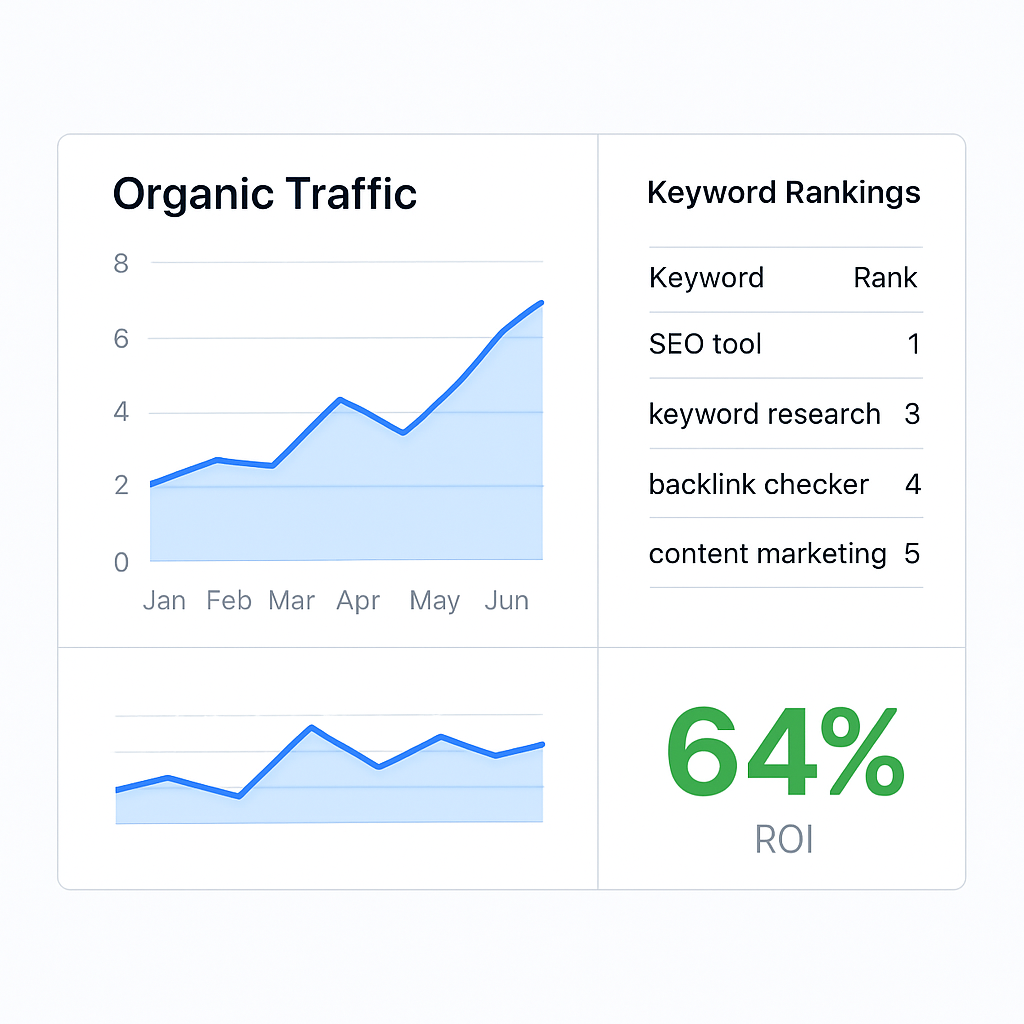
Bottom line: when you tie every automated action back to a concrete number, the “black box” becomes a transparent growth engine. Your team can celebrate wins, troubleshoot losses, and, most importantly, keep the budget justified month after month.
FAQ
What exactly is an automated SEO tool and how is it different from doing SEO manually?
In plain terms, an automated SEO tool is software that handles the repetitive parts of search‑engine optimisation – keyword research, content drafting, on‑page checks, and even outreach – with minimal human clicks. When you do SEO by hand you’re writing spreadsheets, copying data, and sending outreach emails one‑by‑one. The tool speeds that up, but you still steer the strategy, pick the topics, and give the final polish.
How can a digital‑marketing manager at a small‑to‑mid‑size company get started without overwhelming the team?
Start small. Pick one core business goal – say, double blog traffic in three months – and feed a handful of seed keywords into the tool’s keyword engine. Let the platform suggest a cluster, generate a draft, and schedule a single outreach campaign. Review the results after two weeks, tweak the prompt, and then add another cluster. By iterating every fortnight you keep the workload manageable while the automation does the heavy lifting.
Will the AI‑generated content actually rank, or do I need to rewrite everything?
The drafts the tool produces are solid foundations, not finished articles. They usually hit the right keyword density and include suggested LSI terms, which Google likes. A quick read‑through to align the tone with your brand, add a real‑world example, and insert a compelling call‑to‑action is enough to make the piece publish‑ready. In our experience, that light human touch boosts click‑through rates by 10‑15 % compared to posting the raw draft.
How does automated backlink outreach work, and is it safe for my brand’s reputation?
The outreach module pulls a list of high‑authority sites that already rank for similar topics, then personalises each email with the recipient’s recent article or a shared connection. Because the messages are tailored, reply rates stay healthy – often above 20 %. Always run a brief brand‑voice check before the first batch goes out; if the tone feels off, adjust the template. That way you protect your reputation while scaling link‑building.
Which metrics should I track to prove the ROI of an automated SEO tool?
Start with three core numbers: organic traffic growth (sessions from SEO pages), keyword ranking movement for high‑value terms, and the cost per acquisition compared to your paid‑media benchmark. Add a fourth – the number of new referring domains per month – to capture backlink impact. Pull these into a single dashboard and compare month‑over‑month; a positive trend in at least two of the four usually signals a healthy ROI.
How often should I refresh keyword clusters and content prompts?
Search intent shifts, and competitors publish new material all the time. We recommend revisiting your seed list every two weeks. Run the keyword engine again, replace any clusters that have plateaued, and tweak the AI prompt to incorporate fresh LSI terms you’ve seen ranking. A regular cadence keeps your content pipeline aligned with what people are actually searching for right now.
Can I connect an automated SEO tool with my existing CMS, analytics, or CRM stack?
Most platforms offer a simple API key or Zapier webhook that lets you push drafts straight into WordPress, Webflow, or a headless CMS. You can also feed ranking alerts into Slack or Teams, and sync new leads from blog forms into your CRM. Setting up those integrations takes about an hour the first time, and after that the tool updates your dashboard automatically, freeing you from manual data‑entry.
Conclusion
We've walked through how an automated SEO tool can take the grunt work out of keyword research, content drafting, outreach, and performance monitoring.
So, what does that mean for you? It means you can spend the mental energy that used to be glued to spreadsheets on strategy—like figuring out which product line to promote next—while the platform handles the repetitive bits.
In our experience, teams that lock in a regular two‑week refresh of seed keywords and tweak AI prompts see at least a 10 % lift in organic sessions within the first month.
Remember the three checkpoints we highlighted: map clear goals, automate the data pipeline, and set real‑time alerts. If those are in place, the tool becomes a reliable co‑pilot rather than a black box.
And yes, you might still need a human eye on the final draft—adding a brand story or a quirky example can boost click‑through rates by double‑digits.
Ready to turn weeks of SEO grind into a handful of clicks? Grab a free trial, run a pilot on a single topic cluster, and let the numbers tell you if it’s worth scaling.
Keep the momentum by reviewing your dashboard every two weeks, tweaking LSI terms, and celebrating the small wins—those incremental improvements add up to big traffic gains over time.